DB Schema Release

Introduction
Schema Repository → https://github.com/SceneMakerAI/sm_db
This article covers the following topics.
- Table Overview
- How Are Tables Related?
- What Results Are Returned When Queried?
- Querying Multiple Tables
- Search Indexes
1. Table Overview
- The relational database serves as the source for the analysis results. Data is stacked in the following order: video → audio, people, and screen → programming.
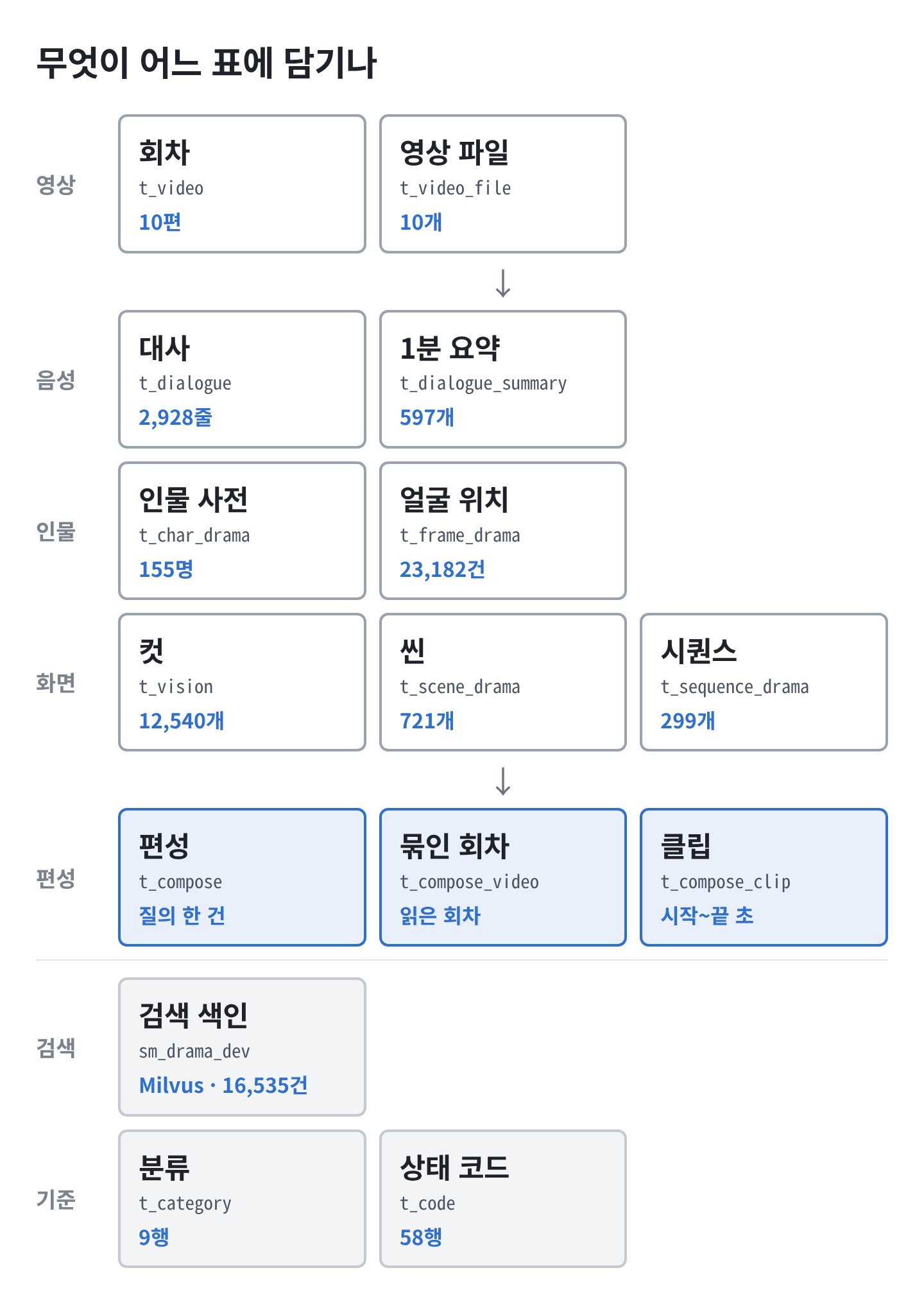
- A one-line summary of each table is as follows.
| Table | What Each Row Represents |
|---|---|
t_video | One episode |
t_video_file | The source file and processing status for that episode |
t_dialogue | One line of dialogue |
t_dialogue_summary | Summary of a 1-minute segment of dialogue |
t_char_drama | One character |
t_frame_drama | One face shown on screen |
t_vision | One cut — until the screen changes once |
t_scene_drama | One scene — a single scene set at the same time and place |
t_sequence_drama | One sequence — a single event |
t_compose | One assignment — a query and its result |
t_compose_video | The episode reviewed for that assignment |
t_compose_clip | One clip selected by that episode |
t_category · t_code | Classification and status code |
- There are 15 tables in total. The remaining one (
t_chapter) is a reserve table and is not used in drama analysis.
2. How Are the Tables Linked?
- There are four types of values used to link tables.
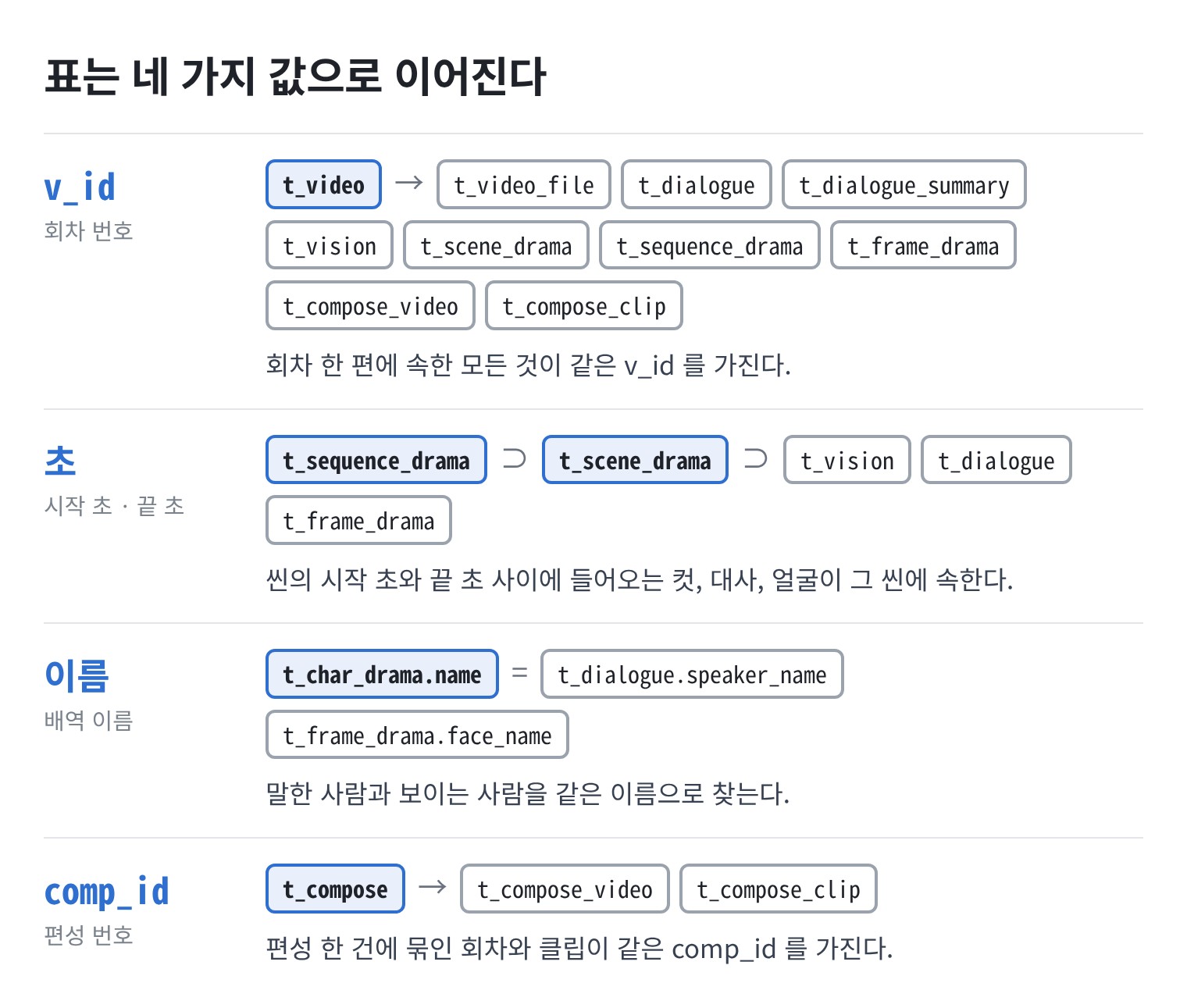
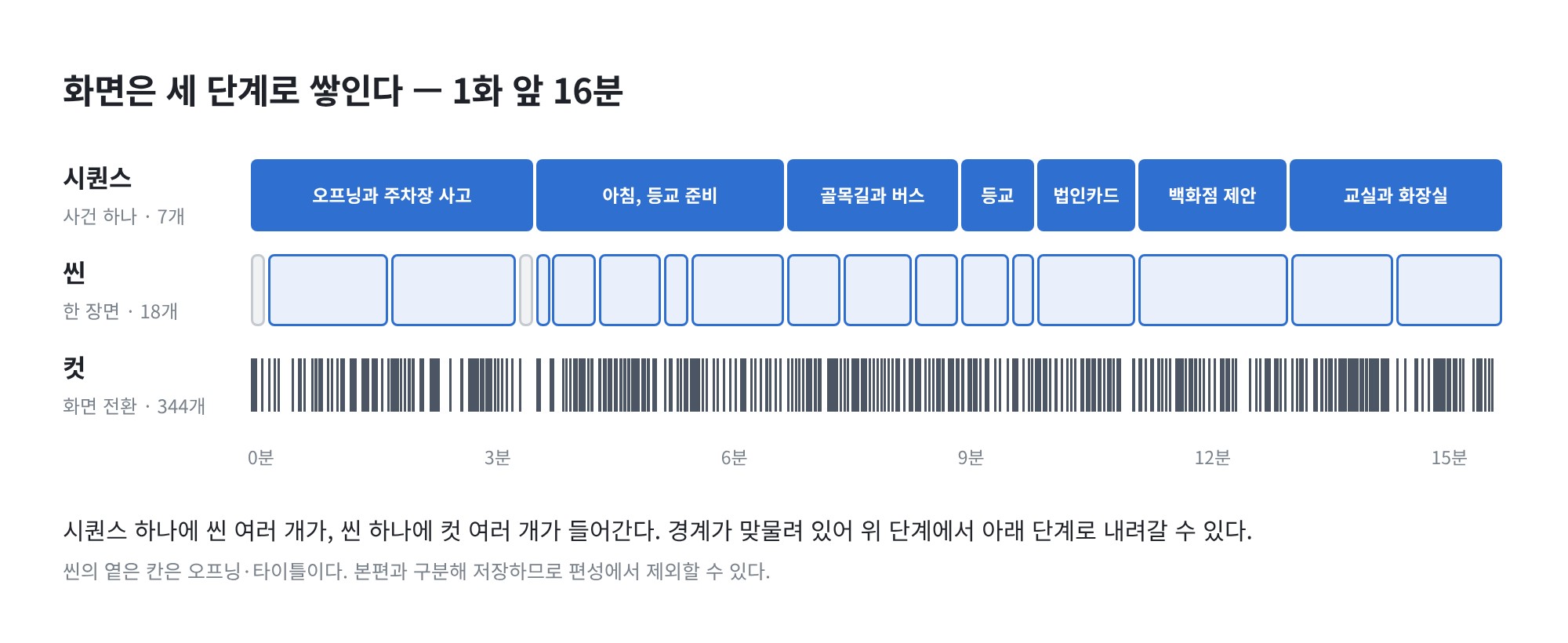
- Among these, seconds are used most frequently. We do not note the specific line numbers for dialogue within a scene. The dialogue that falls between the start and end seconds of a scene constitutes that scene’s dialogue.
- The three tables on the screen side are organized in layers using this method. Scenes are contained within sequences, and cuts are contained within scenes.
3. What Do the Query Results Show?
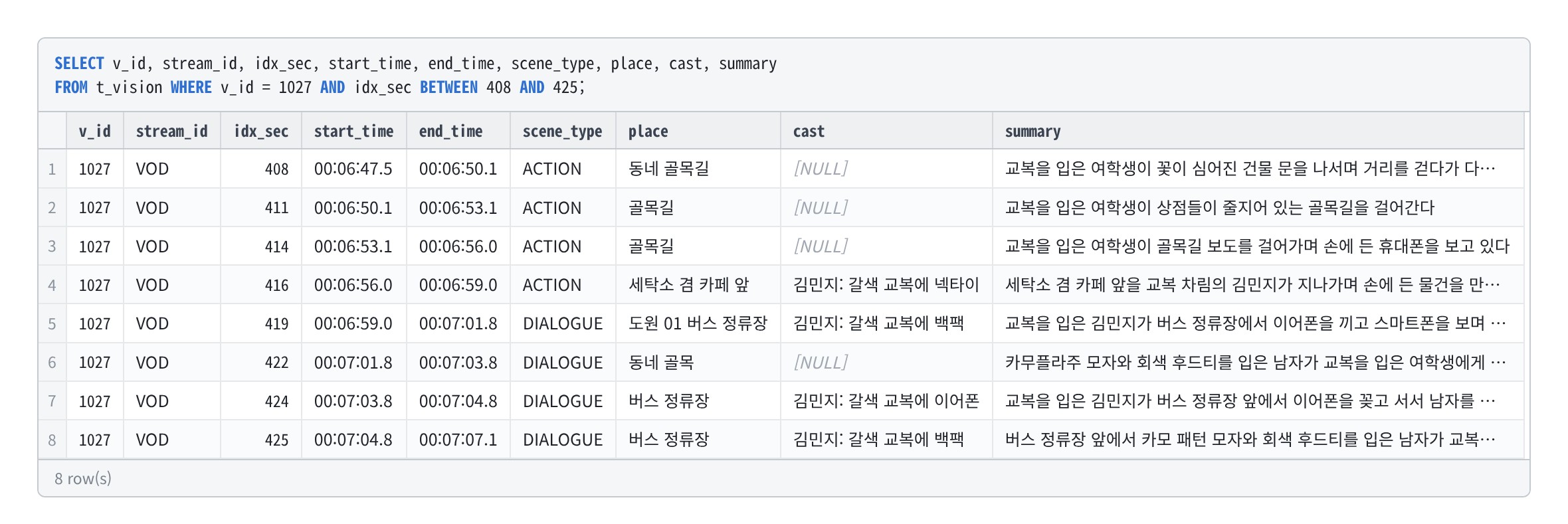
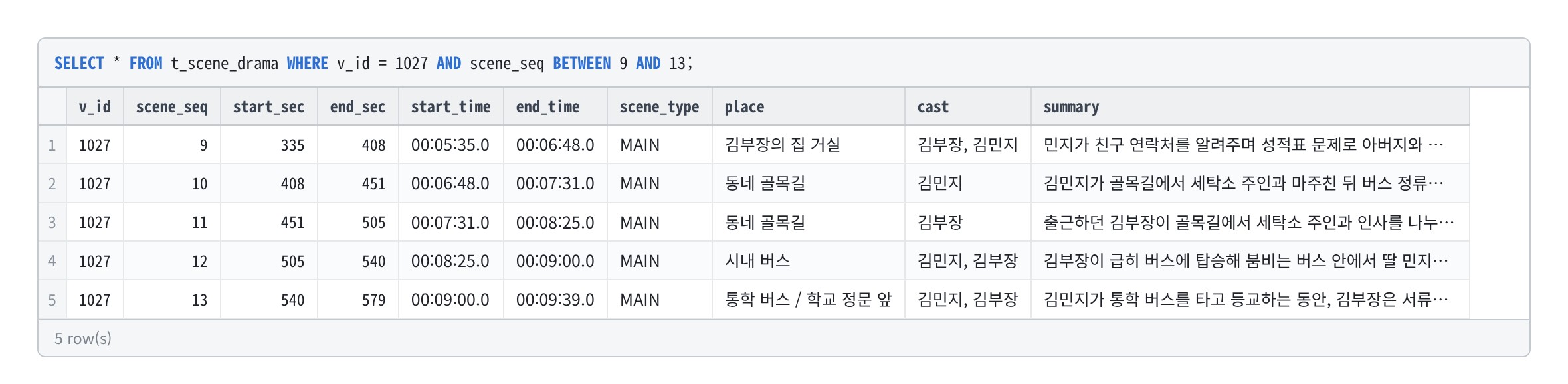
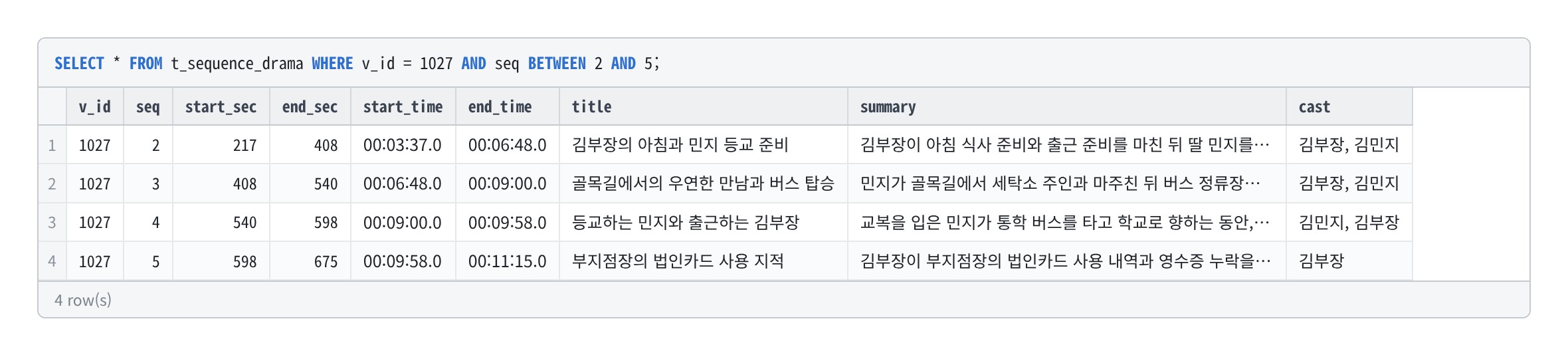
These are the results of a query from the actual database. For Episode 1 (v_id = 1027), around 6 minutes and 48 seconds in—the scene where the protagonist’s daughter walks through an alley on her way to school and boards a bus—was extracted into each table.
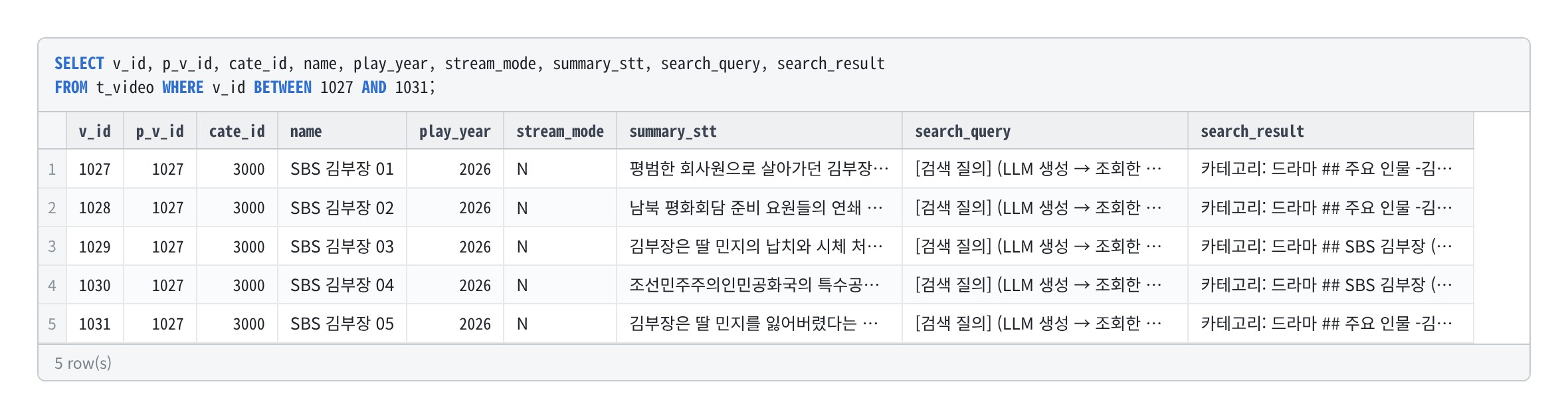
3-1. Episode — t_video
- Each episode is represented by a single row. Ten episodes share the same drama set number (
p_v_id). - It contains a plot summary based on the dialogue and a cast list found online.
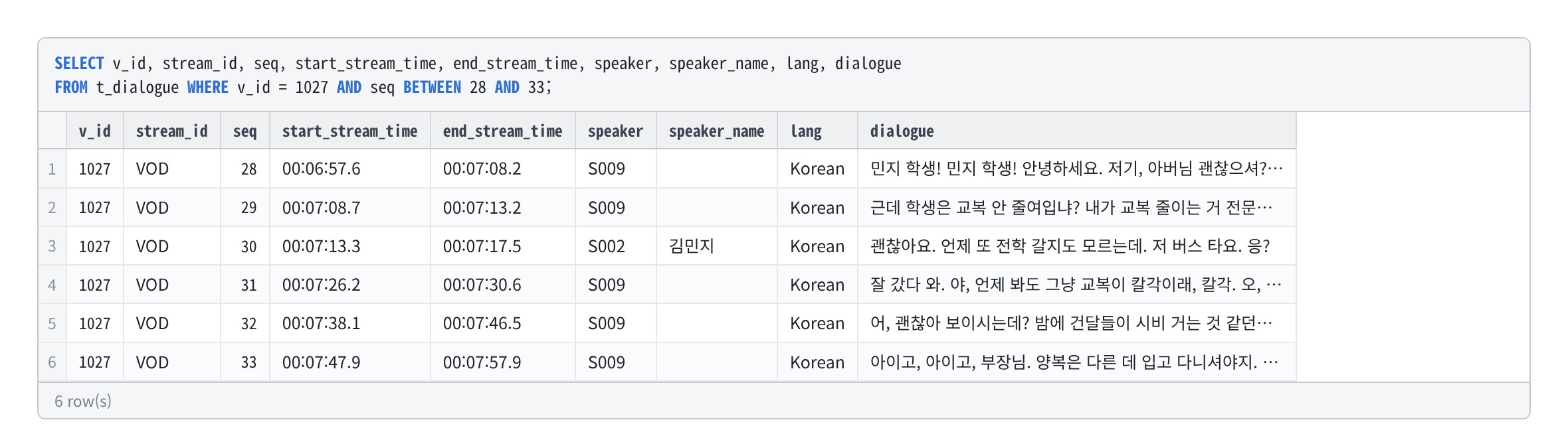
3-2. Dialogue — t_dialogue
- Each line of dialogue is a single line. It includes the start and end times and the speaker’s name.
speakeris a number assigned based on the voice, andspeaker_nameis the name assigned in a subsequent step. The field is left blank for speakers whose names could not be confirmed.
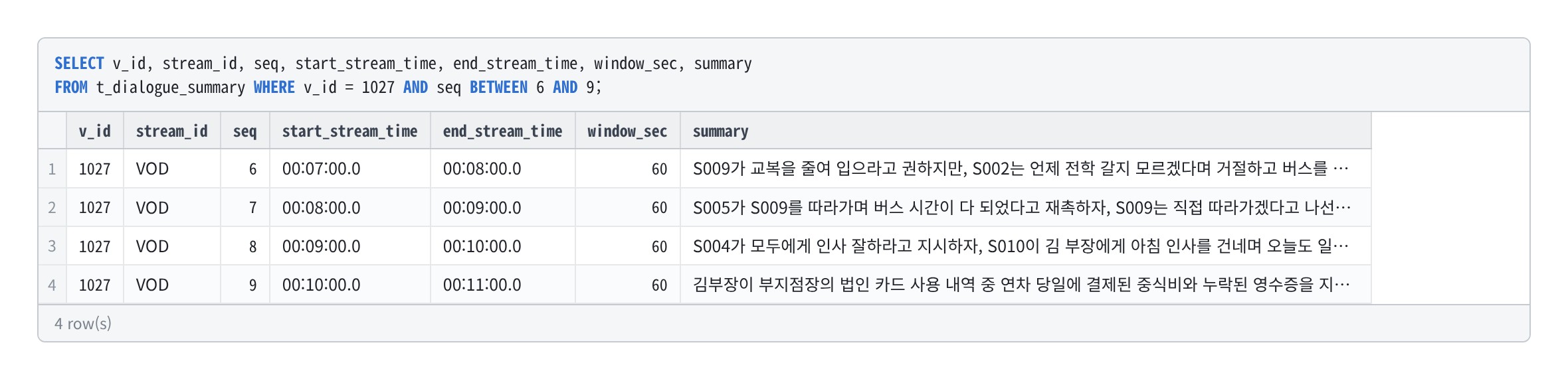
3-3. 1-Minute Summary — t_dialogue_summary
- This is a summary broken down into 1-minute segments of dialogue. It serves as source material when dividing episodes into event-based segments.
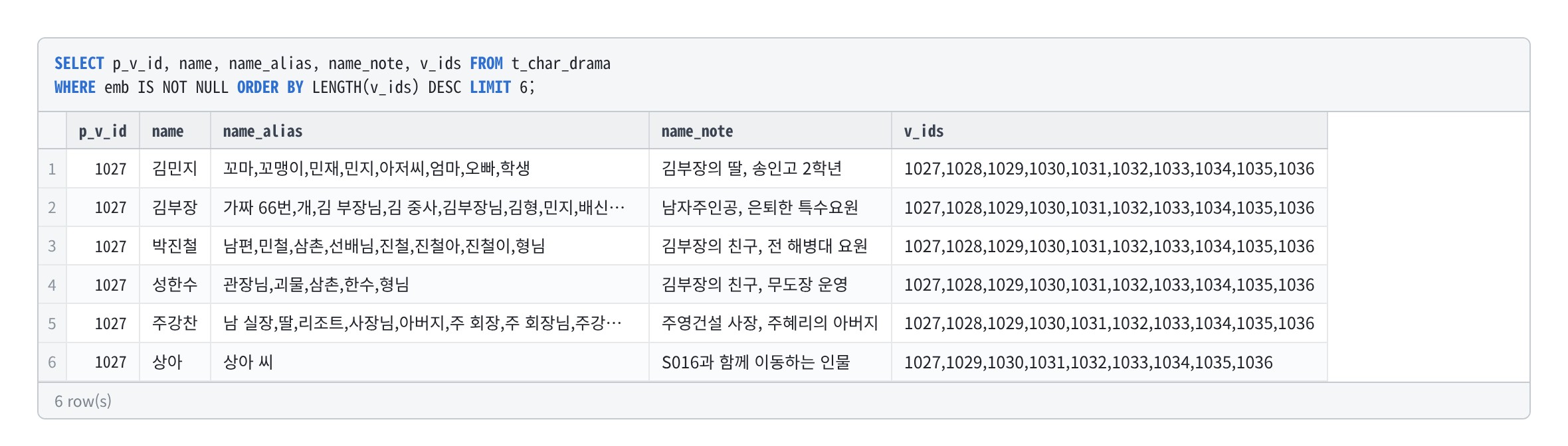
3-4. Character Glossary — t_char_drama
- Each character is listed on a separate line. It includes the character’s name, title, description, and the episodes in which they appear.
- Titles are included because in the drama, characters are often addressed by titles such as “Uncle” or “Manager” rather than by their first names.
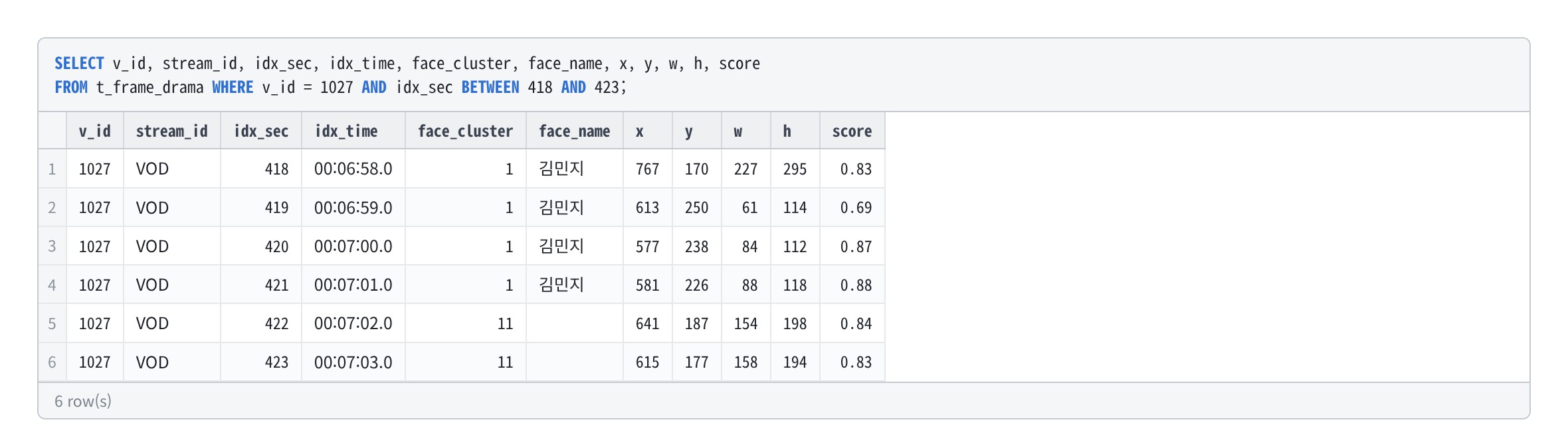
3-5. Face Locations — t_frame_drama
- Each line represents a single face identified in a frame captured every second. It includes the time (in seconds), the location on screen, and the person’s identity.
3-6. Cut — t_vision
- Each line represents the duration until the screen changes once. This averages 3 seconds.
- It includes the type (determined by viewing the screen), location, visible characters, and a one-line description.
3-7. Scene — t_scene_drama
- A single scene that unfolds continuously at the same time and location constitutes one row. This scene is the unit selected by the programming department.
- The type (
scene_type) is used to distinguish between the main program, the opening, commercials, and previews.
3-8. Sequence — t_sequence_drama
- A single event constitutes one line. It includes a title and a summary.
3-9. Schedule — t_compose · t_compose_video · t_compose_clip
- This is the result of creating a clip list based on a single query. Each entry is divided into three tables.
-
The schedule includes the query, target duration, resulting length, and number of clips.
-
For grouped episodes, each episode covered by that schedule is listed on a separate line.
-
Each clip includes the playback order, episode number, and start and end times.
-
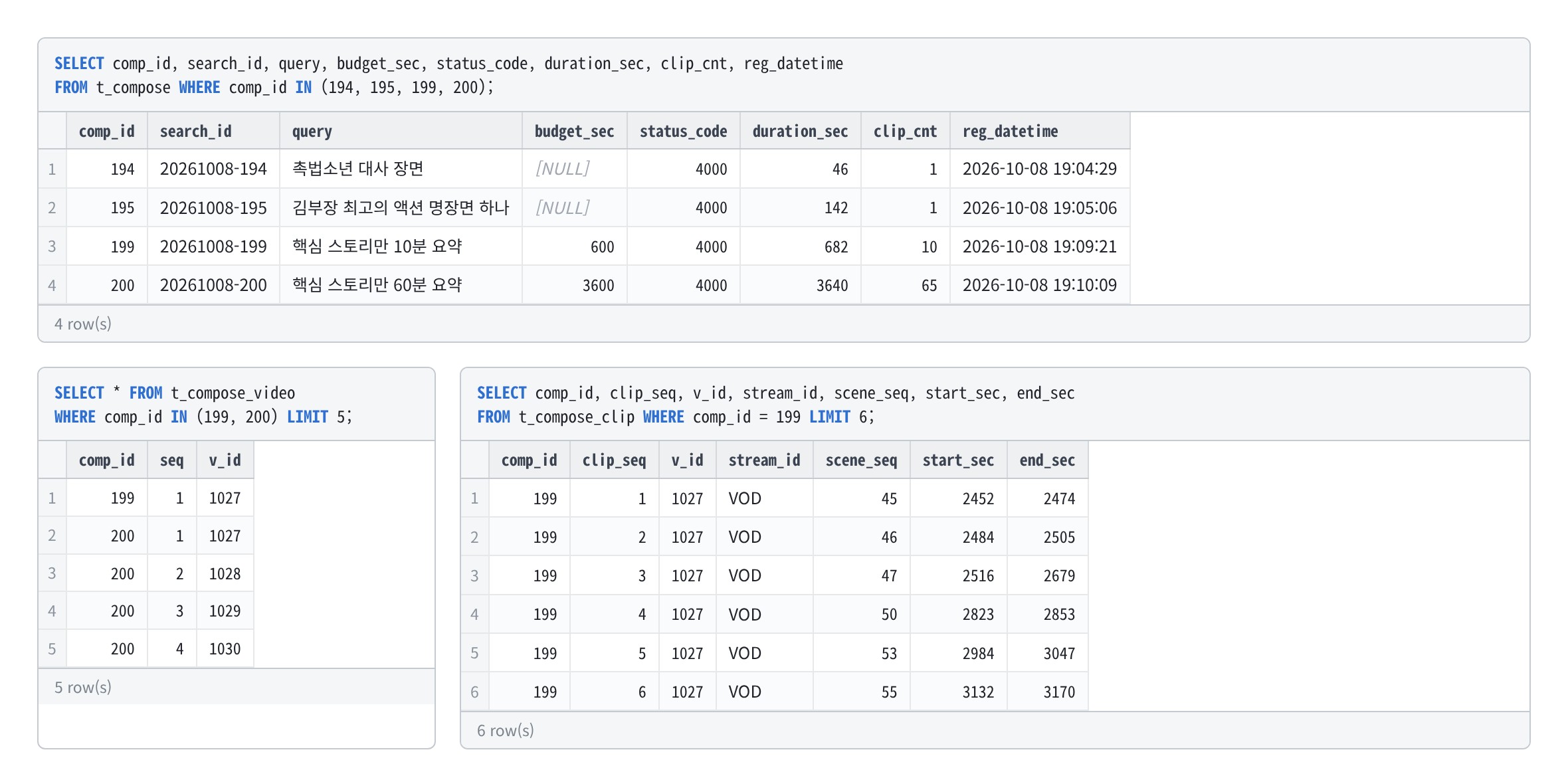
- Clips are not video segments but coordinates. When combining them into a video, they are cut from the original source according to these coordinates.
4. Querying Consecutive Tables
- You can query tables sequentially by using the concatenation values from Section 2.
- Below is an example of extracting dialogue from Scene 10 in Episode 1. It selects entries where the episode number matches and the start time of the dialogue falls between the scene’s start and end times.
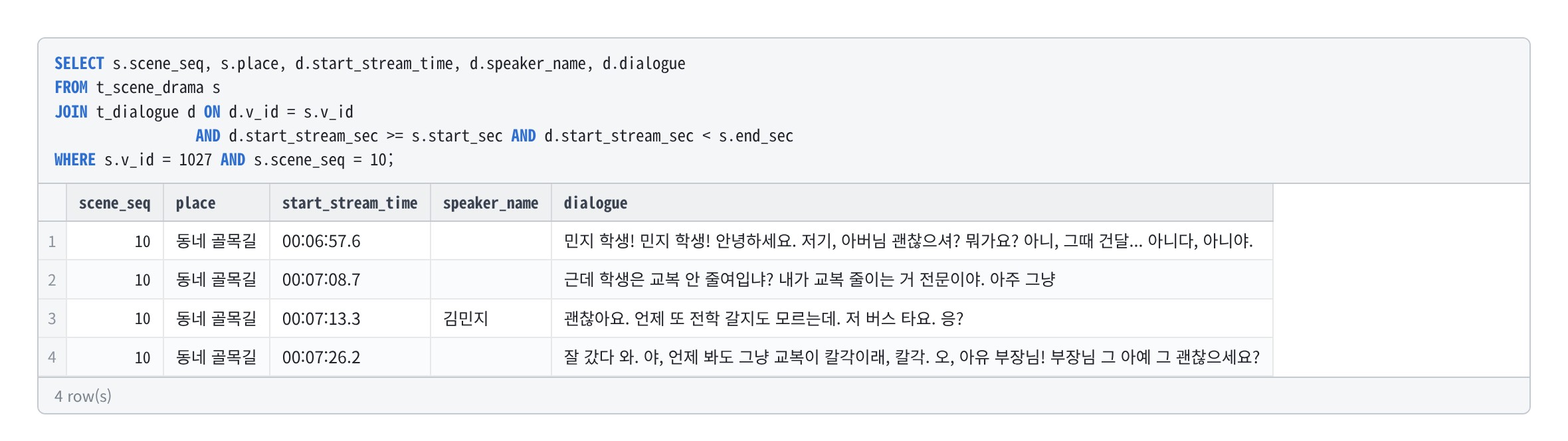
- In the same way, you can extract a scene’s cuts, faces appearing in the scene, and the scenes in which a clip appears.
- This is why clips have their own start and end times, separate from the scene number. If scenes are regrouped, the scene numbers are reassigned, but the times remain unchanged.
5. Search Index
- To find scenes similar to a query, text from the relational database is converted into vectors and stored separately in Milvus.
- Querying the index yields results as shown below. A summary of the scene around 6 minutes and 48 seconds into Episode 1, along with cut descriptions and dialogue, are all included in a single collection.
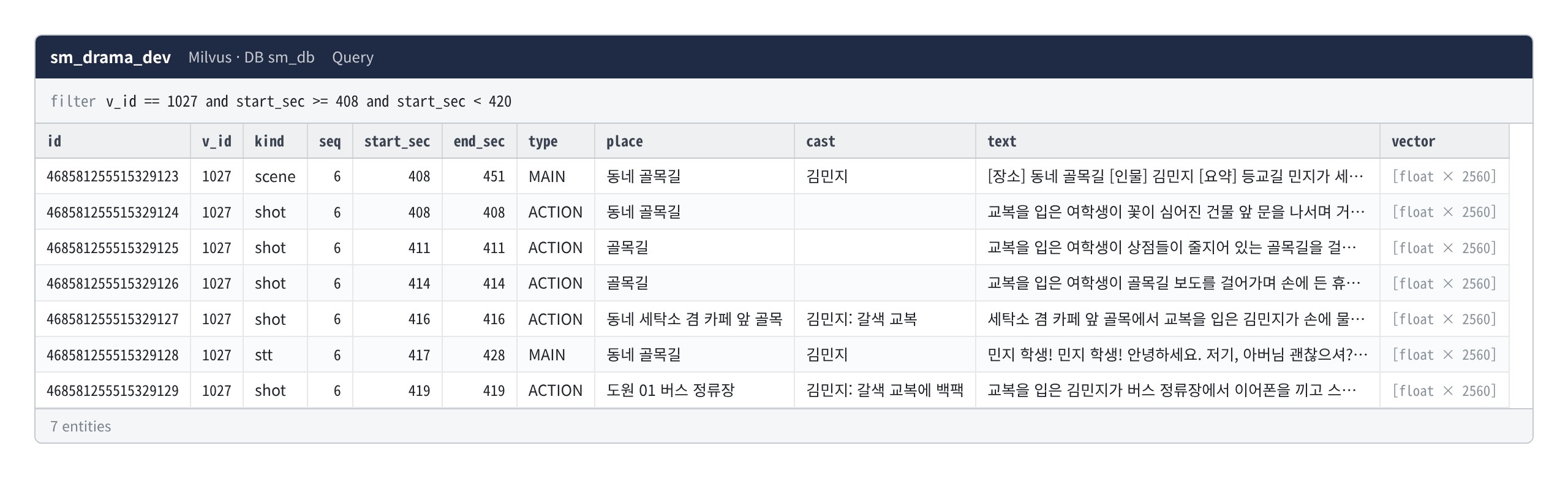
- Searching by vectors returns results in order of semantic similarity. Below are the results of searching for similar scenes based on a single scene from the index.
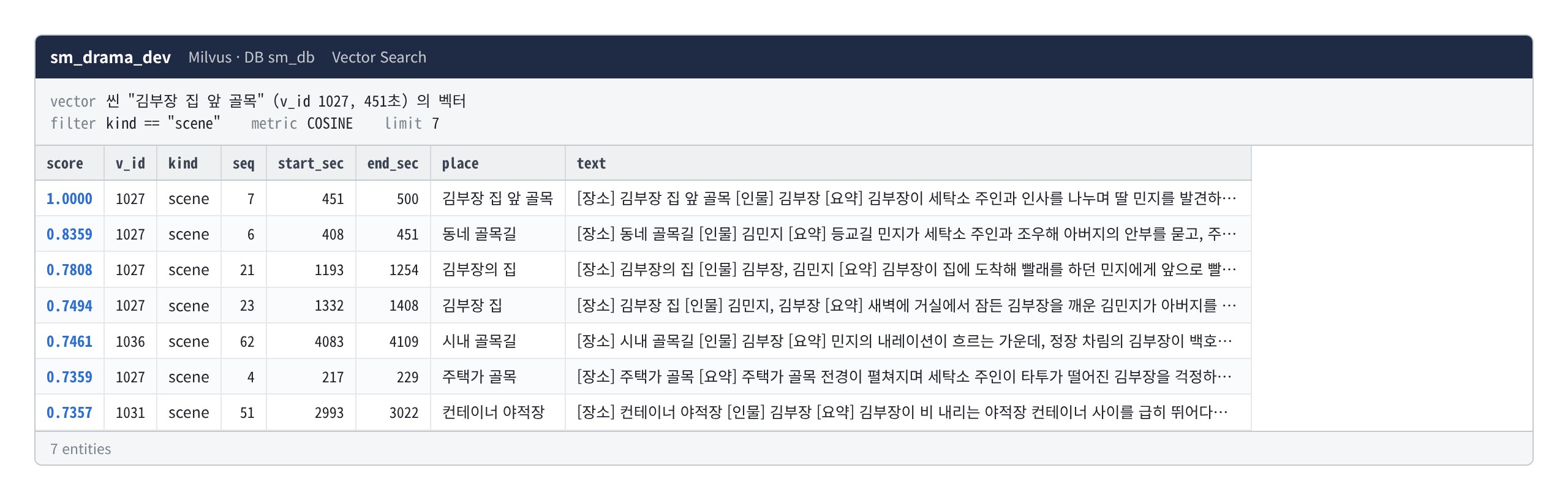
- We combine the five types of content into a single collection. This is so that users can find what they’re looking for—whether it’s the plot, dialogue, or visuals—all at once.
- Regardless of the search result, users can return to the corresponding scene in the relational database by following the episode number and start/end timestamps. The scene number in the index (
seq) is the number at the time the index was created, so it may differ from the scene number in Section 3. - Since the index is generated from the relational database, it can be recreated even if deleted.
Conclusion
We have revealed the database structure containing the analysis results for the 10 episodes of “Manager Kim.”
The current structure is summarized as follows:
- It consists of 15 relational database tables and one search index collection.
- The tables are linked by episode number, seconds, name, and broadcast number.
- Screen content is stored in three levels: cut, scene, and sequence.
- By retrieving the repository, the same structure can be loaded with a single command.
Column types, keys, and all reference data are contained in the repository’s definition file. The structure changes continuously during development, and whenever it changes, the repository definition is regenerated to match.
https://github.com/SceneMakerAI/sm_db
Reference Links)
- https://mariadb.com/kb/en/documentation/
- https://milvus.io/docs
- https://huggingface.co/Qwen/Qwen3-Embedding-4B
This article presents the results of research conducted with support from the Ministry of Science and ICT and the National IT Industry Promotion Agency under the “2026 Open-Source AI and Software Development and Utilization Support Project.”