10_Analysis of Broadcast AI Service Performance Benchmark Results

Introduction
The technical objectives of this project are twofold: processing performance and scene analysis accuracy. We measured what we could currently verify using processing logs from 10 episodes of the SBS drama “Manager Kim.” According to the logs, processing performance is within the target range, while accuracy has not yet been measured.
In the previous post, we covered the process of analyzing and scheduling video content, as well as the data structures that store the results. This post addresses how long the process takes and how close we are to our goals.
Here are the project’s two technical goals and their current status.
| Metric | Target | Current Status |
|---|---|---|
| Processing Performance | Process 1 hour of broadcast within 20 minutes | Recorded at 11 minutes and 27 seconds per hour. Within target |
| Scene Analysis Accuracy (F1) | 0.70 or higher (40–60-minute videos), 0.65 or higher (60–120-minute videos) | Not measured. Will be measured in an official test |
Processing performance is calculated based on our own records. It will be measured again in an official test.
This article covers the following topics.
- What Was Measured and How
- Analysis processing time
- Scheduling response time
- Verification of scheduling results
- Accuracy (F1)
1. What Was Measured and How
The subject of analysis is the 10 episodes of “Manager Kim.” The total runtime is 10 hours and 53 minutes, with each episode ranging from 60 to 73 minutes.
Two metrics were measured.
| Metric | Definition | Recorded Data |
|---|---|---|
| Analysis Processing Time | The time from when a video is loaded until the analysis results are saved | Start and end times recorded in the processing log |
| Query Response Time | From the time a query is received until the clip list appears | The time the query was received |
These times were not measured by running the process anew but were calculated based on the times recorded in existing logs.
These records are from September 16 to October 8, 2026.
2. Analysis Processing Time
The analysis is divided into three stages:
Extraction—extracting audio and video from the footage; Speech Analysis—transcribing and refining the dialogue; and Visual Analysis—dividing the footage into cuts and scenes.
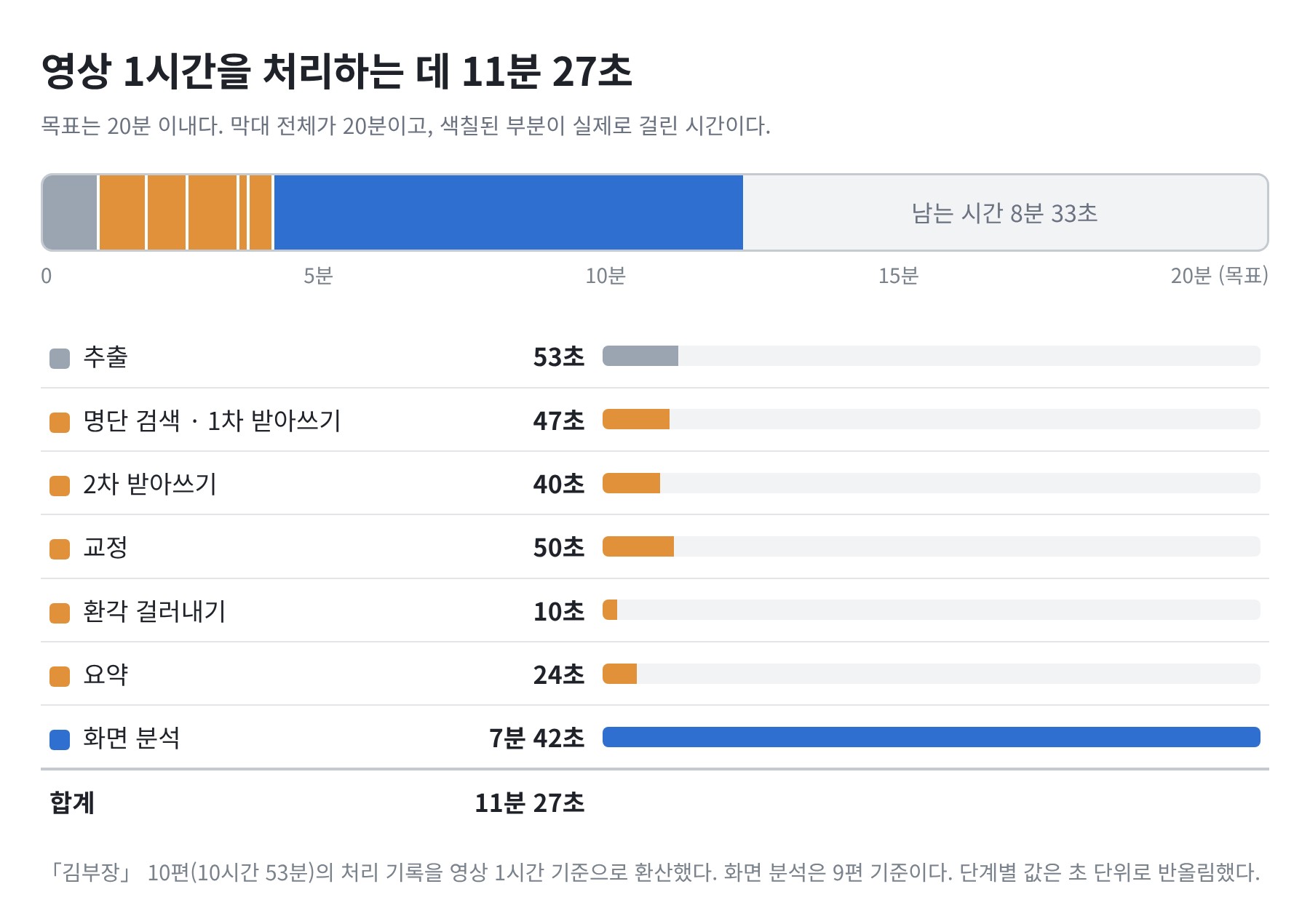
- It takes 11 minutes and 27 seconds to process 1 hour of video. This is 8 minutes and 33 seconds shorter than the target of 20 minutes.
- Two-thirds of the time is spent on visual analysis. This stage involves reviewing each cut to identify its type and add a description.
- Speech analysis takes a total of 2 minutes and 52 seconds across all five steps.
The totals by process are as follows.
| Process | Episodes Processed | Total Video Length | Time Taken | Per Hour of Video |
|---|---|---|---|---|
| Extraction | 10 episodes | 10 hours 53 minutes | 9 minutes 36 seconds | 53 seconds |
| Speech Analysis | 10 episodes | 10 hours 53 minutes | 31 minutes 8 seconds | 2 minutes 52 seconds |
| Visual Analysis | 9 episodes | 9 hours 47 minutes | 75 minutes 18 seconds | 7 minutes 42 seconds |
| Total | 11 minutes 27 seconds |
The breakdown by episode is as follows.
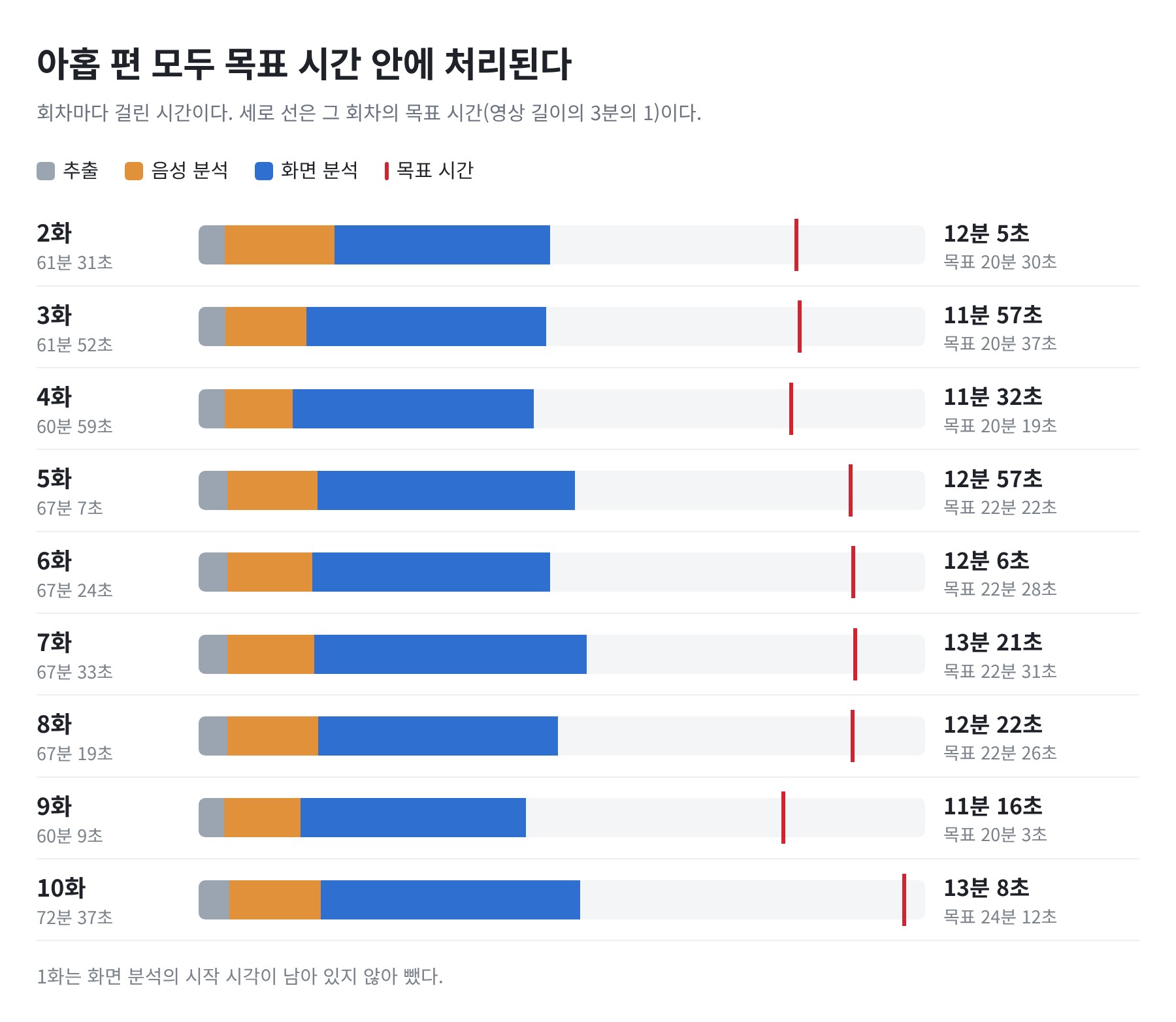
- The nine episodes that measured all three processes range from 11 minutes 16 seconds to 13 minutes 21 seconds.
- All nine episodes are more than 8 minutes shorter than the target time for that episode. Episode 2, which had the least margin, is 8 minutes 25 seconds.
- The difference between episodes is around 2 minutes.
How Time Was Measured
- Extraction and Speech Analysis: The processing logs contain the start and end times for each episode. I used the difference between these times. These are records from runs conducted on September 16–17, 2026.
- Visual Analysis: On October 8, I reprocessed all ten episodes one after another. I considered the processing time for each episode to be the duration from the end of one episode to the end of the next. Episode 1, which had no start time, was excluded.
Points to Note When Interpreting These Values
- These values were not measured by running a single episode from start to finish in one go. The extraction and speech analysis records from September were added to the visual analysis records from October.
- Visual analysis may include waiting time between episodes. Consequently, the recorded time is longer than the actual duration.
- The step of assigning names to speakers was not included.
3. Schedule Response Time
When a query is entered into a video that has been analyzed, a list of clips appears. This is the time it takes to reach that point.
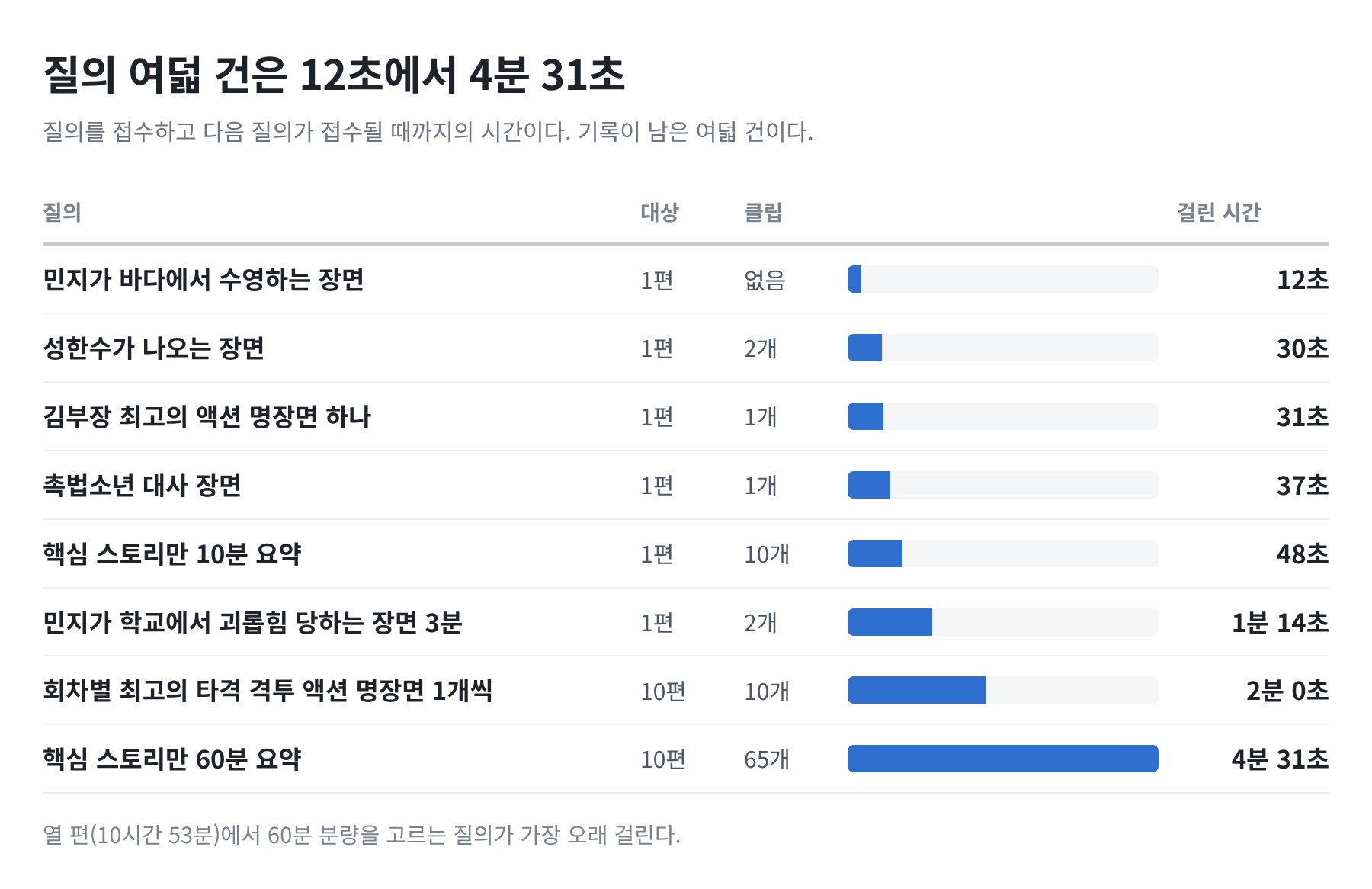
- A query to find a scene within a single episode takes between 30 seconds and just over 1 minute.
- A query to select 60 minutes of footage from all ten episodes takes the longest, at 4 minutes and 31 seconds. This is the time it took to process approximately 11 hours of source material and select 65 clips.
- Queries with no matching scenes are completed in 12 seconds.
These times were measured from a log of twelve queries executed consecutively. They represent the time from when one query was submitted to when the next one was submitted.
- Completion times are not recorded separately. These values are calculated assuming that the next query began immediately after the previous one finished. If there was a wait in between, the time recorded will be longer than the actual duration.
- For the same reason, the time taken for the last query in a batch and for queries executed separately is not recorded. The figure above shows eight queries, excluding the three that asked about ad placements.
4. Verifying the Scheduling Results
Even if the results come out quickly, they’re useless if they’re incorrect. I checked the verification screen to confirm whether the scheduling results matched the request.
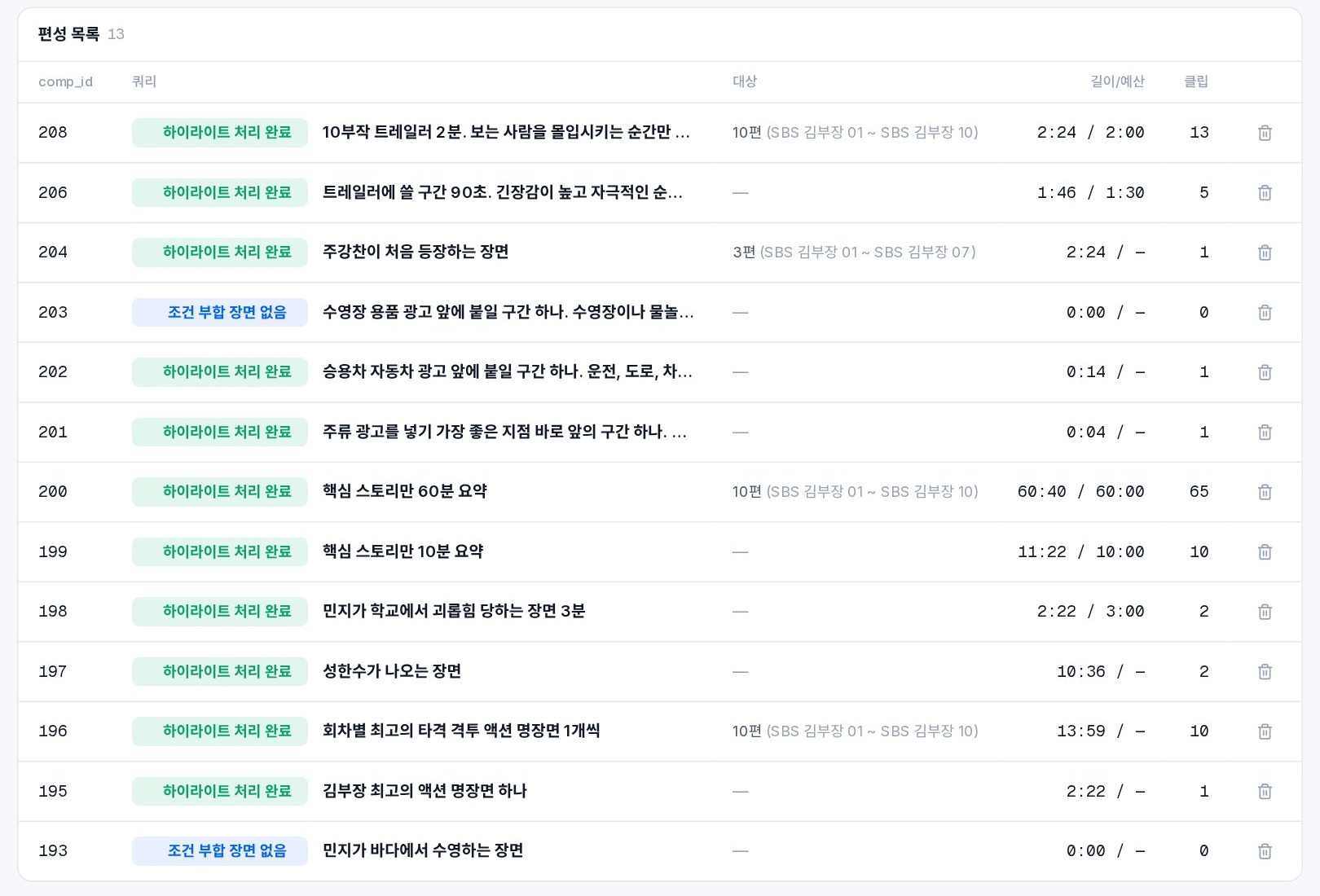
The results are listed one line per query. When you open a line and click a clip, that segment of the original video plays immediately. I verified five queries.
| Query | Target | Result | Did it match the request? |
|---|---|---|---|
| 60-minute summary of key storylines only | 10 episodes | 60 minutes 40 seconds, 65 clips. Only the main footage in all ten episodes | Yes |
| Scene where Joo Kang-chan first appears | 3 episodes | 1 scene: the first appearance, in Episode 1 | Yes |
| One iconic combat action scene per episode | 10 episodes | One per episode, totaling 10. All are combat scenes | Yes |
| A scene of Min-ji swimming in the ocean | 1 episode | 0 clips. No such scene was found in the analysis records | Yes |
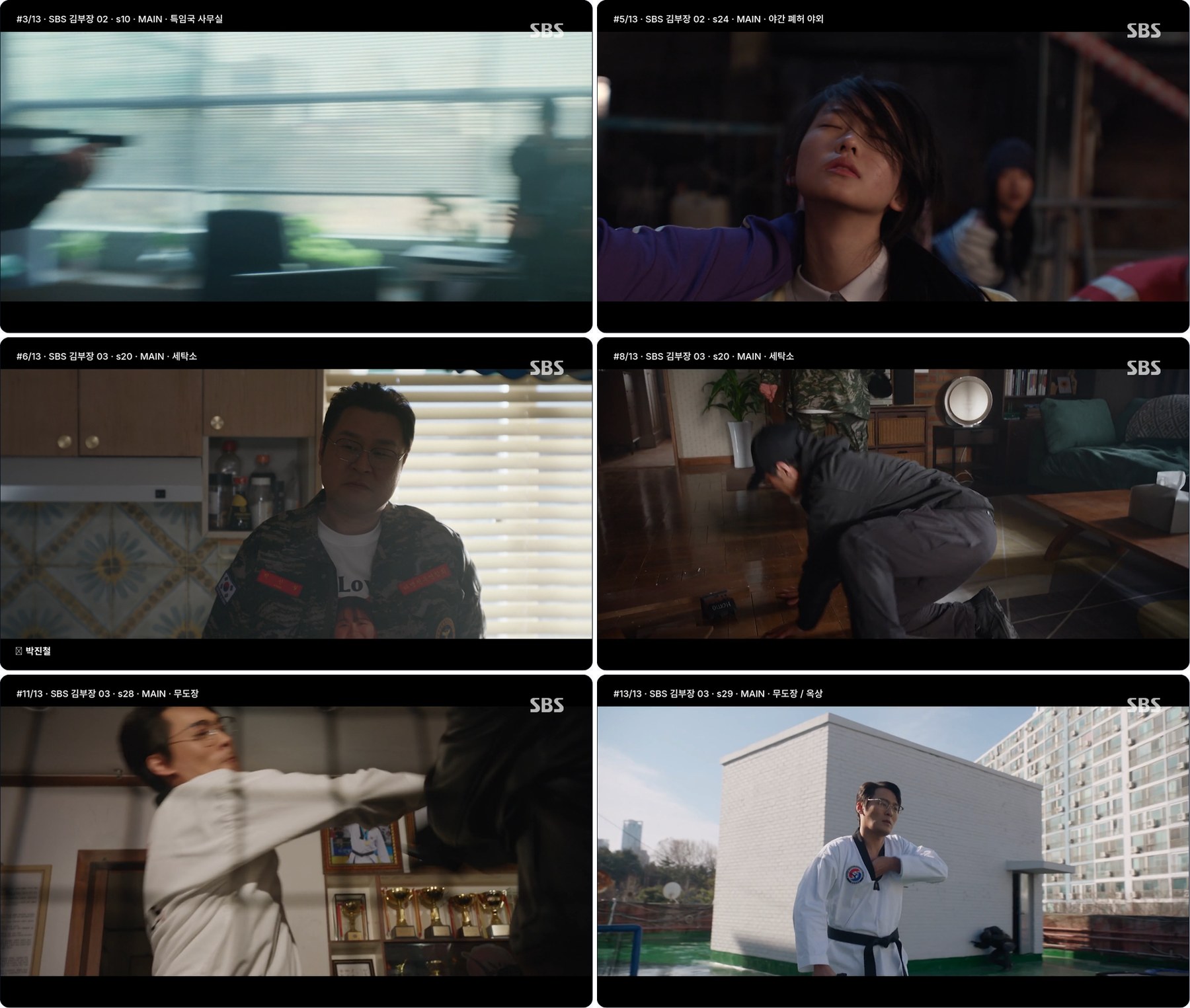
| 2-minute trailer for the 10-episode series (full version below) | 10 episodes | 2 minutes 24 seconds, 13 clips. All taken from fight and shootout scenes in Episodes 1–3 | Only partially |
The verification method varied by query.
- 60-Minute Summary: I verified the runtime, episode distribution, and whether they were from the main series using scheduling records. I did not determine whether the 65 selected clips constituted the core plot.
- First Appearance Scenes: We played the clips and compared them to the point at which the character first appeared in the analysis records.
- Memorable Action Scenes, Trailers: We played all the clips in their entirety.
- Missing Scenes: We reviewed all scene descriptions in Episode 1 to confirm that such scenes were absent.
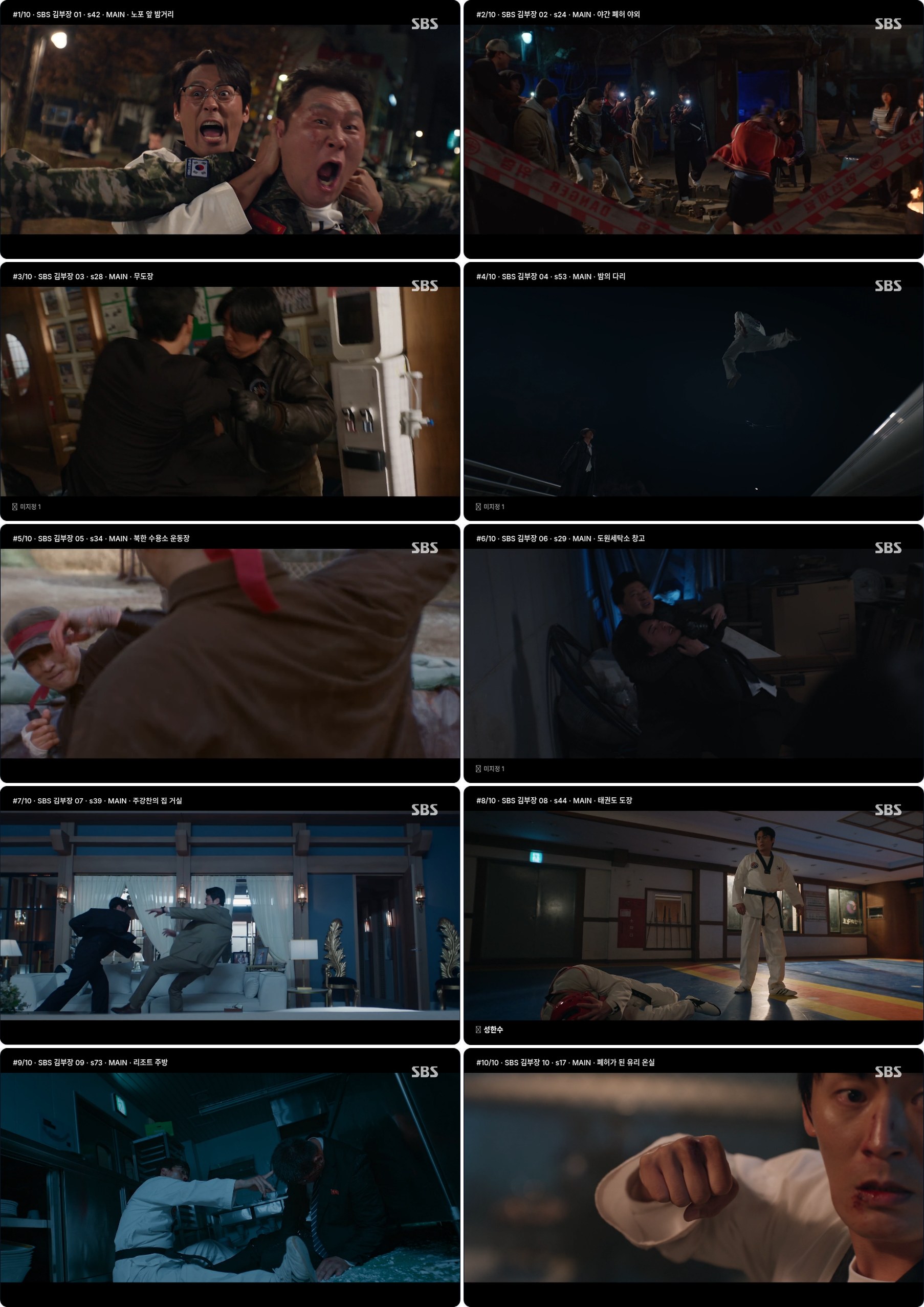
Below are screenshots from playing the ten clips selected for the “Action Highlights by Episode” query. There is one clip for each episode, from Episode 1 to Episode 10.
The full text of the trailer query is as follows. There are several overlapping instructions.
A 2-minute trailer for the 10-episode series. Select only moments that immerse the viewer. Mix a balanced blend of intense moments (fights, shootouts, threats, revelations, screams, collisions) and funny or heart-fluttering moments (quirky dialogue, absurd situations, subtle glances between characters, confessions, physical affection). Exclude explanatory scenes and everyday scenes. Compose the trailer using many short clips, regardless of the story’s flow.
The result followed the instructions for many short clips and intense scenes, but did not meet three requirements.
- The runtime is 20% longer than the target.
- All 13 scenes came from episodes 1–3. There are no scenes from episodes 4 through 10.
- Not a single funny or heart-fluttering moment was included.
Target Runtime vs. Results
These are the results for the five queries that specified a runtime target. The 60-minute target was met by a margin of 1%, while targets of 10 minutes or less were off by 14–21%.
| Target Runtime | Result | Difference |
|---|---|---|
| 60 minutes | 60 minutes 40 seconds | 1% longer |
| 10 minutes | 11 minutes 22 seconds | 14% longer |
| 3 minutes | 2 minutes 22 seconds | 21% shorter |
| 2 minutes | 2 minutes 24 seconds | 20% longer |
| 1 minute 30 seconds | 1 minute 46 seconds | 18% longer |
5. Accuracy (F1)
The second metric is scene analysis accuracy, measured by F1. F1 evaluates two factors:
- Precision: The proportion of correct selections among those chosen by the system.
- Recall: The proportion of items actually found among those that should be found.
F1 is the harmonic mean of these two metrics. Simply selecting many items to boost recall, or selecting only a few to boost precision, will not improve the score.
The benchmark varies depending on the video length. Since every episode of “Manager Kim” exceeds 60 minutes, a threshold of 0.65 or higher applies.
To measure this value, each scene in the video must have a correct answer marked by a human. The system’s analysis of each scene is then compared to that correct answer for scoring. Since scoring against the correct answer data has not yet been performed, this post does not include an F1 score.
The verification in Section 4 is not based on F1. It involved directly judging the results of the five queries on screen, rather than comparing the scene analysis results with the correct answers.
Conclusion
We measured the processing time based on the processing logs for the 10 episodes of “Manager Kim” and compared it to the target.
- The analysis processing time was 11 minutes and 27 seconds per hour of video, which is within the target of 20 minutes. This figure includes the combined time for extraction, speech analysis, and visual analysis.
- The scheduling response time ranged from 12 seconds to 4 minutes and 31 seconds across the eight cases for which records were available.
- Of the five queries, four produced results as requested as far as was checked, while the one with overlapping instructions was only partially fulfilled.
- Scene analysis accuracy (F1) has not yet been measured.
Processing time is calculated based on execution logs. Both processing time and accuracy will be measured in a certified test.
This article presents the results of research conducted with support from the Ministry of Science and ICT and the National IT Industry Promotion Agency’s “2026 Open-Source AI and Software Development and Utilization Support Project.”