Project Introduction and Qwen 3.6 Application in the Broadcasting Domain

Introduction
At a broadcast station, it takes several days for a professional editor to create a single “Character Roundup” video. To produce these for all five main characters in a 16-episode drama, it would take several weeks.
YouTube Shorts, Reels, TikTok—since the optimal format varies by platform, we have to re-edit the same source material at least three times.
Advertising is an entirely different issue. Current VOD ad scheduling likely relies on mechanical allocation based on metadata such as time slot and genre.
Demand for K-content is exploding, yet repurposing it remains tied to manual labor. The bottleneck is clear.
In this post, I’ve outlined what we’re creating, how we’ll create it, and our future plans.
1. What Are We Building?
A service that enables AI to understand videos, identify stories, store them, and then automatically perform compilation, remixing, and ad optimization
We’ve decided to adopt an OpenWeight model and adapt it to the broadcasting domain using RAG and prompt engineering.
Here’s an overview of the service.
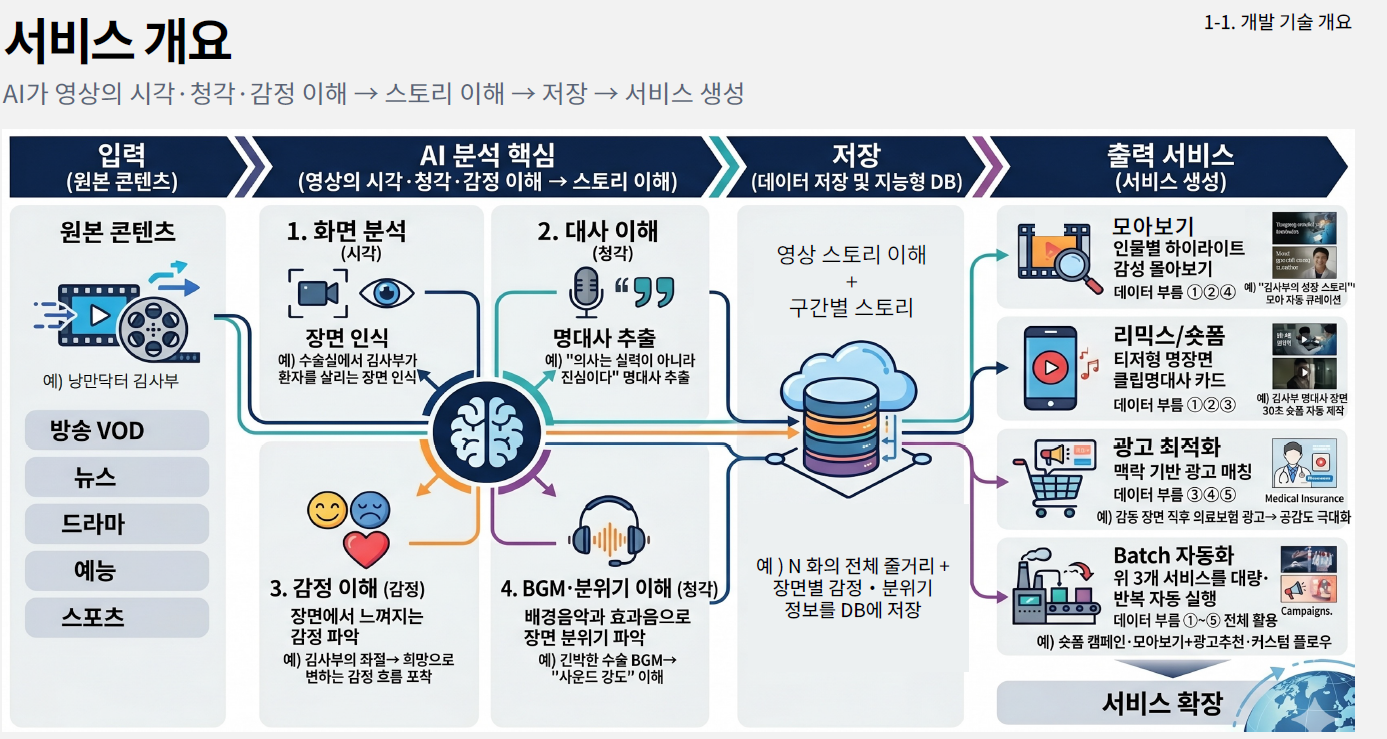
| Planned Service | What It Does |
|---|---|
| Compilation | Automatically generates binge-watching guides, character-specific highlights, and emotional montages |
| Remix / Short-Form | Trailers, highlight clips, and quote cards; automatic conversion for each platform |
| Ad Optimization | Recommendations for optimal ad insertion points based on scene context and emotional flow |
| Batch Automation | Batch processing of large volumes of content by templatizing the above three functions |
2. How It Works — 4 Steps
The entire pipeline consists of four steps, as follows.
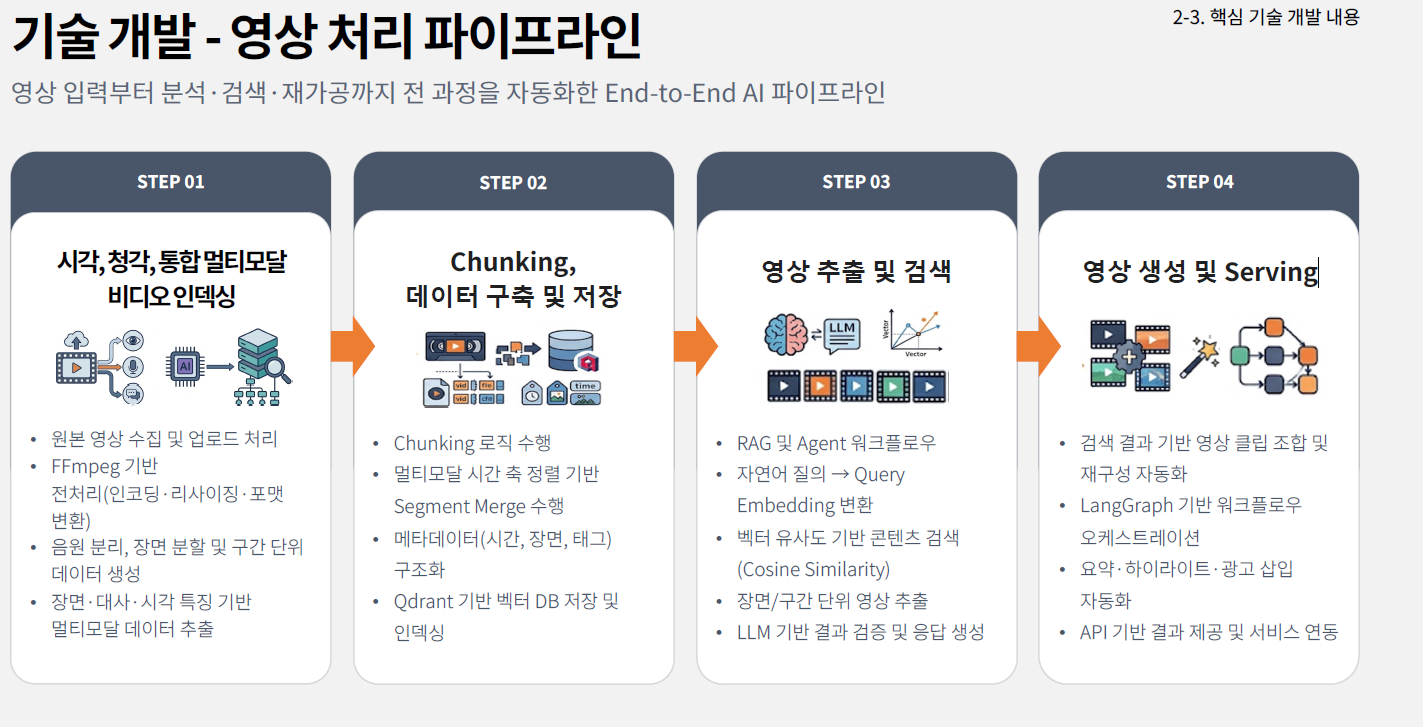
| STEP | Name | One-Line Summary |
|---|---|---|
| 01 | Multimodal Video Indexing | Breaks down the video into a format readable by AI |
| 02 | Chunking · Storage | Groups scattered information into meaningful scene units and stores them |
| 03 | Video Extraction · Search | Finds the desired scenes using natural language queries |
| 04 | Video Generation · Serving | Assembles the found scenes into actual output |
This might seem a bit complicated, so I’ll provide an explanation for each step.
STEP 01 — Visual-Auditory Integrated Multimodal Video Indexing
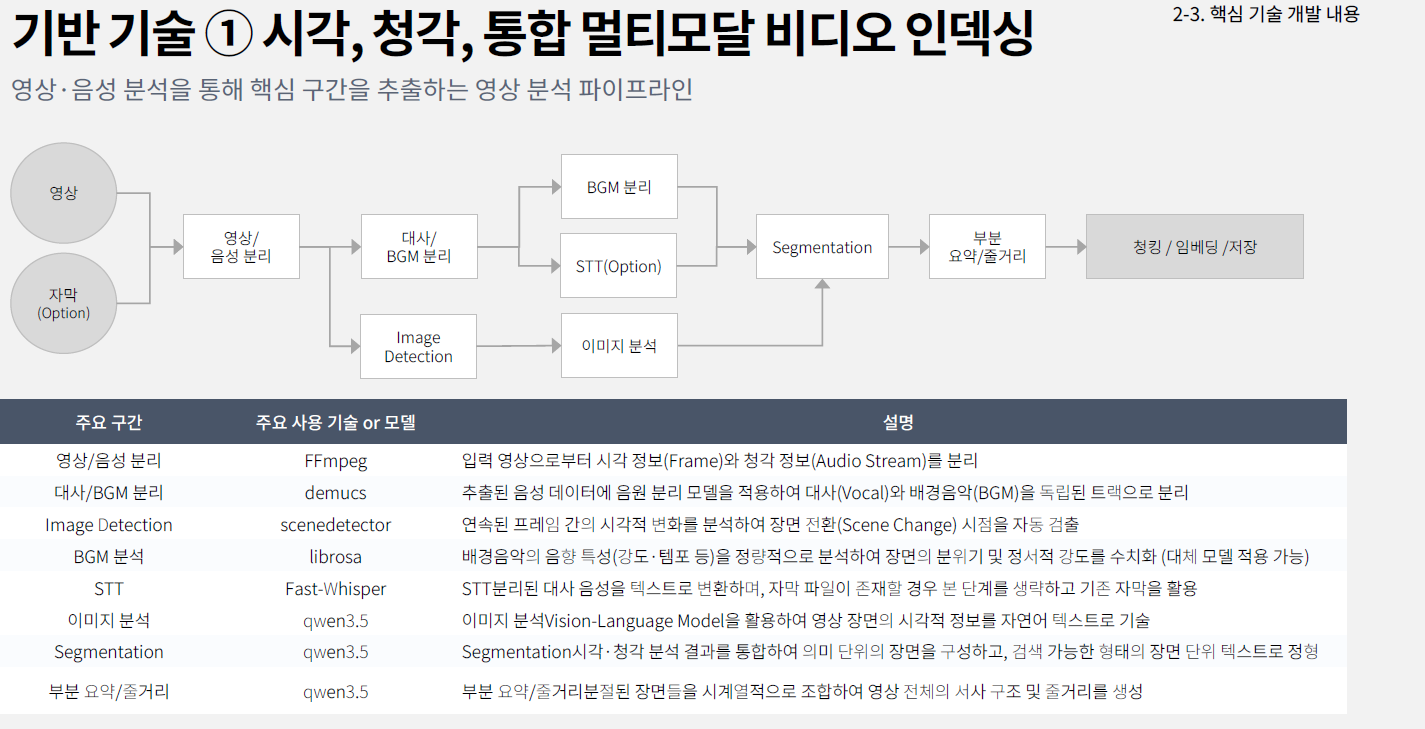
Instead of simply feeding video to the VLM, we decided to select only the parts worth showing to the VLM.
After that, we decided to optimize performance using the tools listed below.
| Section | Tool | Function |
|---|---|---|
| Video/Audio Separation | FFmpeg | Separates frames and audio streams |
| Dialogue/BGM Separation | demucs | Separates dialogue and background music into independent tracks |
| Scene Change Detection | PySceneDetect | Automatically detects cut points → Determines analysis units |
| STT | faster-whisper | Converts dialogue to text. Obtains timestamps for each word |
| BGM Analysis | librosa | Quantifies scene atmosphere based on acoustic characteristics (intensity, tempo) |
| Image Analysis · Summary | Qwen3.6 | Inferred scene meaning by integrating the above results |
One thing I learned here:
VLM is an eye, not a pipeline. If you skimp on preprocessing, even the best model won’t work. Half of domain adaptation happens outside the model.
STEP 02 — Chunking, Data Construction, and Storage
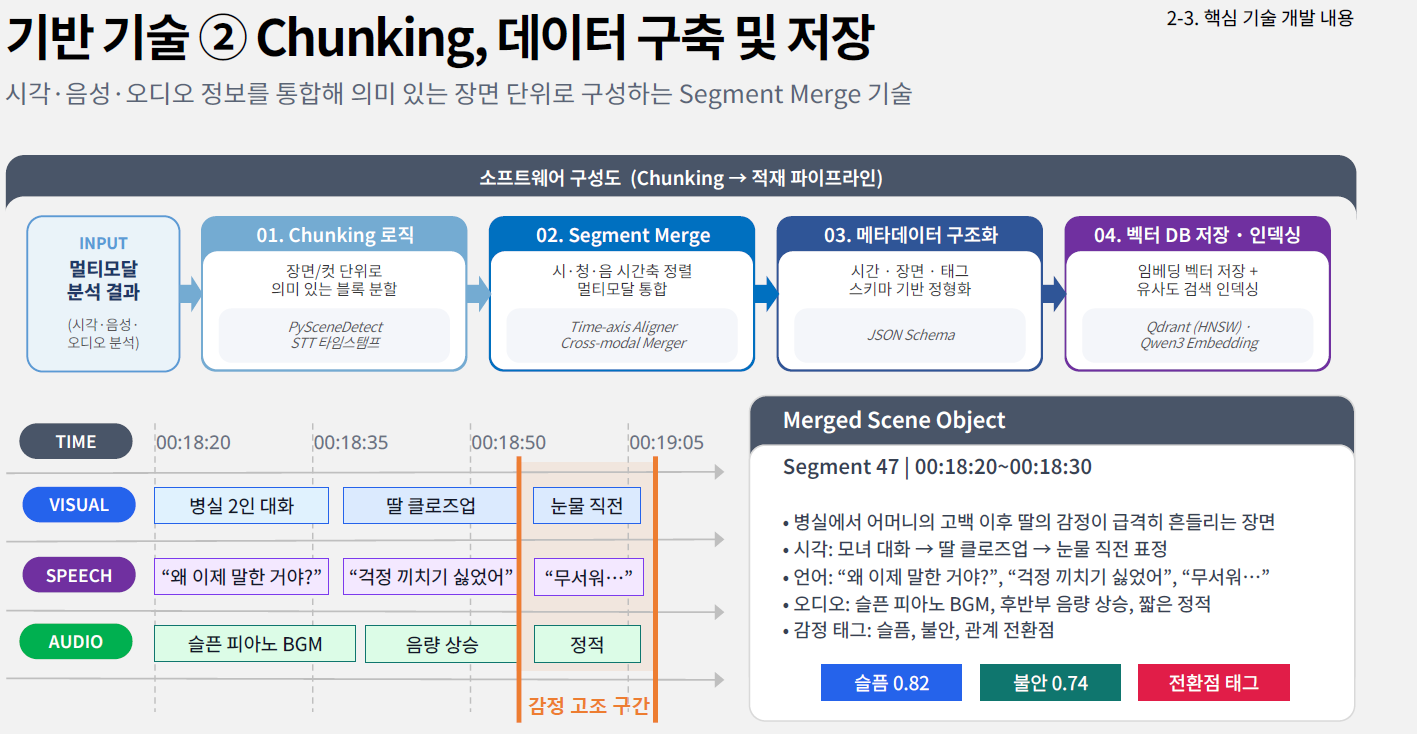
So, we align visual, speech, and audio data on the same timeline and regroup them into meaningful units.
The output looks like this. (Planned to be in JSON)
Segment 47 | 00:18:20 ~ 00:18:30
─────────────────────────────────────────────
Summary: A scene in which the daughter's emotions are thrown into turmoil following her mother's confession in the hospital room
Shot   Conversation between mother and daughter → Close-up of the daughter → Expression just before she starts crying
Language   "Why did you wait until now to tell me?" / "I didn't want to worry you." / "I'm scared..."
Audio: Sad piano background music, volume increases toward the end, brief silence
Emotions:   Sadness 0.82   Anxiety 0.74   [Relationship Turning Point]
We embed this object in Qdrant (vector DB) and store the structured metadata in MariaDB.
It’s a hybrid structure that supports both semantic search and condition-based filtering simultaneously.
STEP 03 — Video Extraction and Search
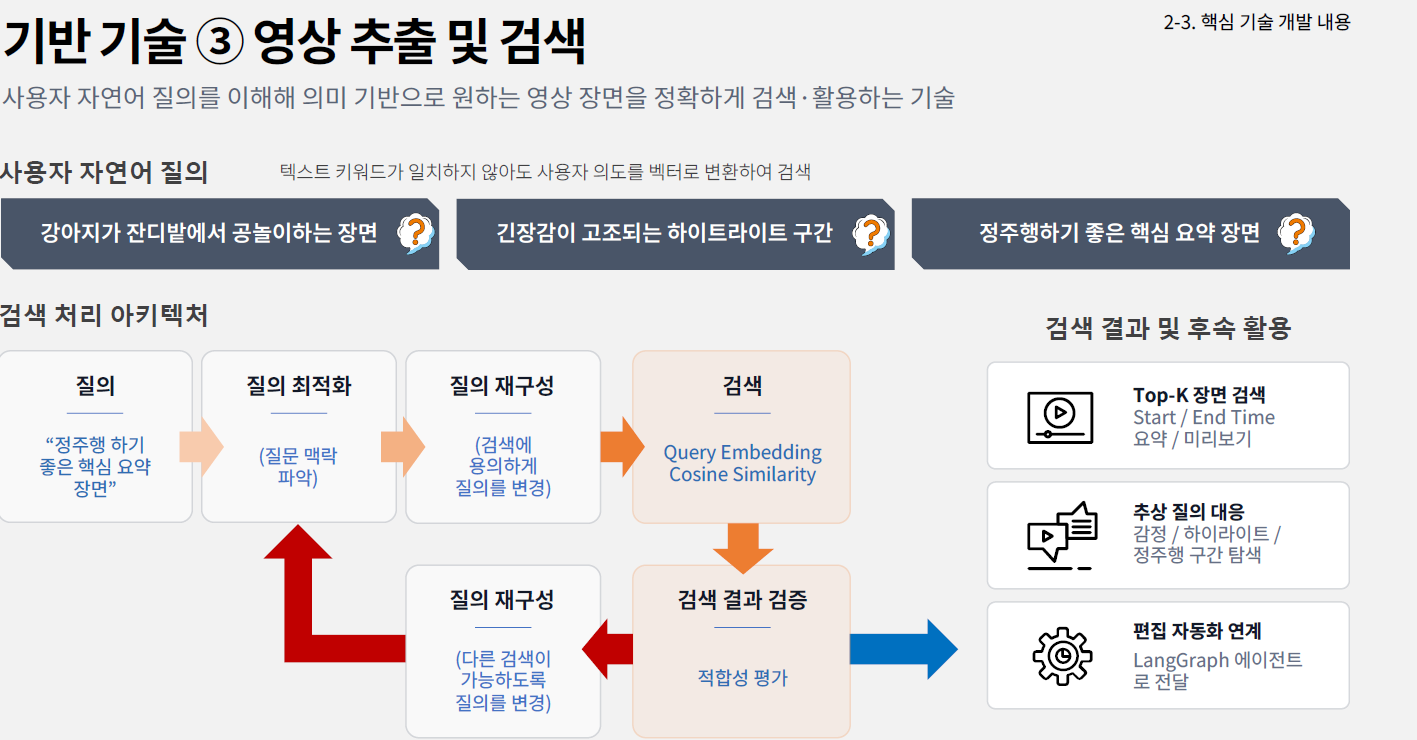
Existing metadata searches only return results if keywords match exactly.
We have decided to adopt Langraph, which allows for query re-composition, for this service.
Since it’s a graph-based cyclic structure rather than a simple linear pipeline, it reportedly returns to the previous step on its own and retries if the results are unsatisfactory.
STEP 04 — Video Generation and Serving
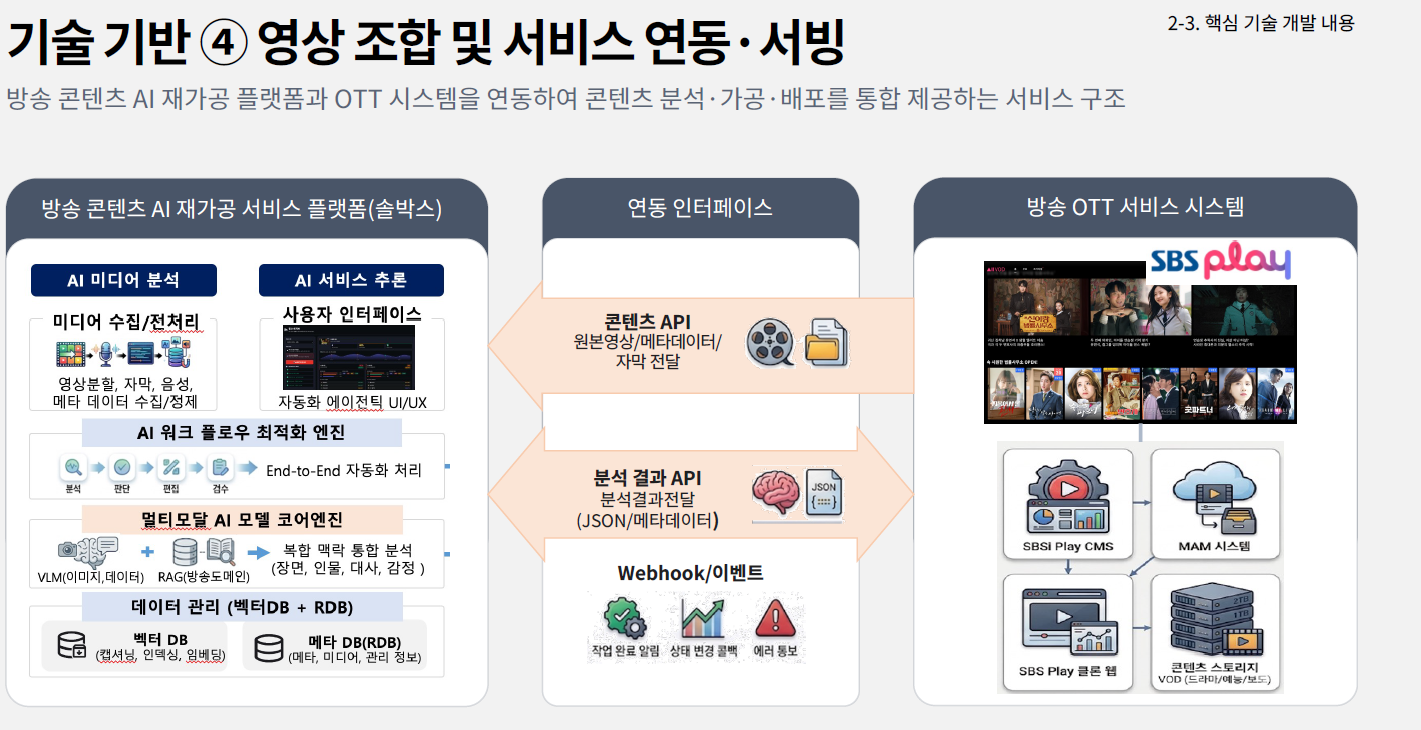
The searched segments are assembled into actual video. Rather than re-encoding the video, we plan to extract only the necessary segments to maintain original quality while outputting them in platform-specific aspect ratios (16:9 / 9:16).
We have decided that LangGraph will orchestrate this entire process.
3. OpenWeight Models Used
As of now, we are experimenting with the following two models:
| QWEN3.6-27B | https://huggingface.co/Qwen/Qwen3.6-27B |
|---|---|
| Qwen3.6-35B-A3B | https://huggingface.co/Qwen/Qwen3.6-35B-A3B |
4. System Setup and Service Workflow
💡 July 2026 / Two months into the project; I’ve documented the systems and services that have been set up.
System Setup
We decided to use two GPUs.
| Instance Name | GPU Model | Number of GPUs | Total GPU Memory (VRAM) | Memory Specifications |
|---|---|---|---|---|
| g7e.2xlarge | NVIDIA RTX PRO 6000 Blackwell | 1 | 96 GB | GDDR7, bandwidth 1,597 GB/s |
| g7e.12xlarge | NVIDIA RTX PRO 6000 Blackwell | 2 | 192 GB (96 GB each) | GDDR7, supports direct communication between GPUs (P2P) |
I drew a diagram including the web, API, and DB.
This diagram reflects the current status as of today and may differ at the time of final deployment.
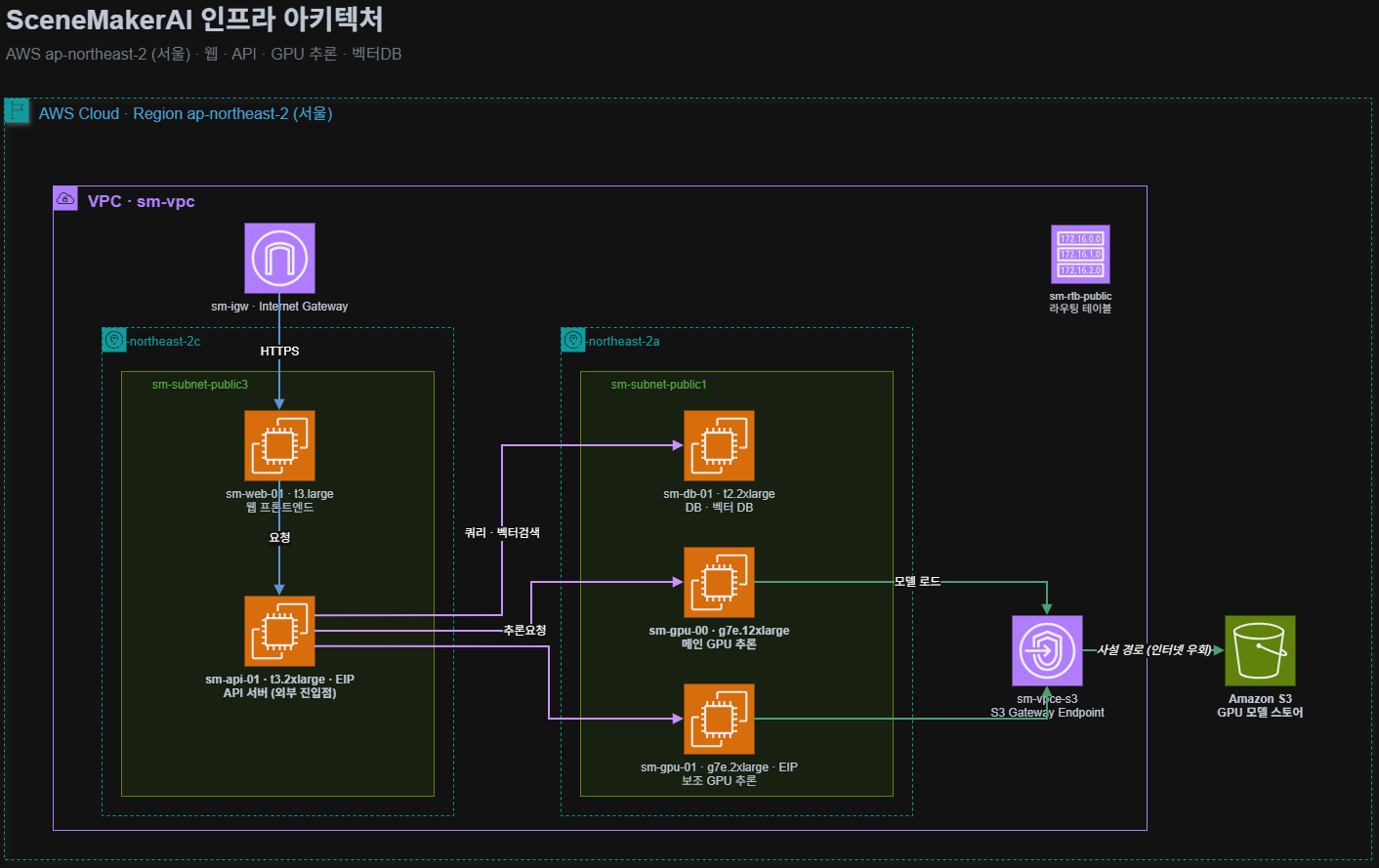
Service Flow
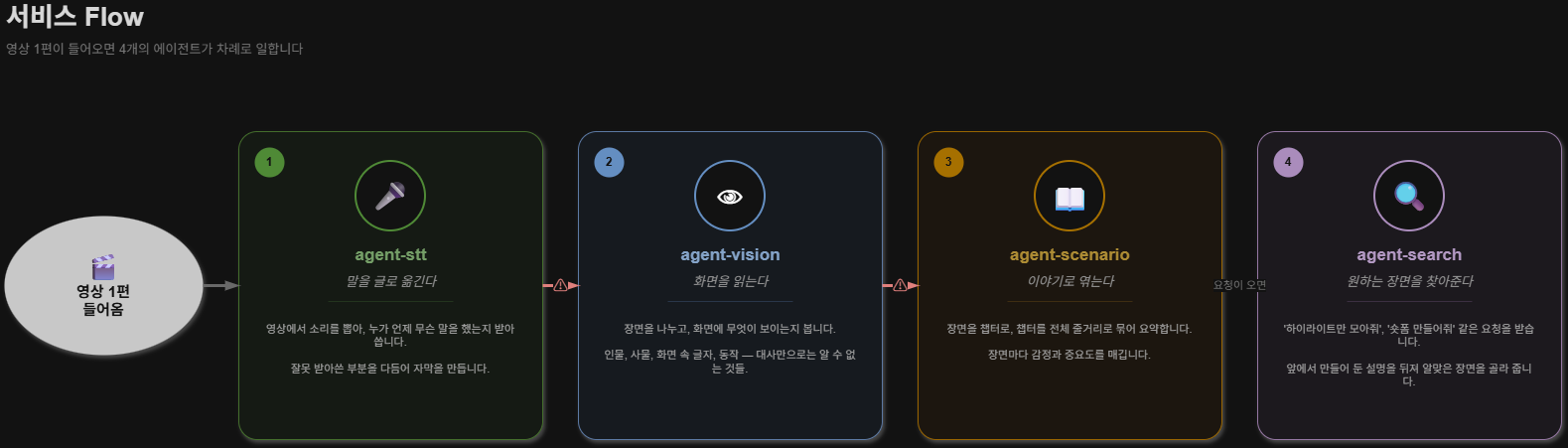
The following four agents have been built as of today.
| Agent | Role | Key Stack |
|---|---|---|
| agent-stt | Speech recognition, speaker-specific dialogue extraction, subtitle generation | faster-whisper, demucs |
| agent-vision | Scene detection, frame analysis, visual context inference | PySceneDetect, Qwen3.6 VLM |
| agent-scenario | Narrative structure identification, emotional flow analysis, scene merging | Qwen3.6, RAG |
| agent-search | Natural language query → scene search, segment extraction | Qdrant, Embedding |
We have separated it into four independent agents. (Additionally, for STT, we are currently performing up to a second round of correction.)
I’ve summarized the current service flow in a diagram.
5. Preview of the Next Post
In this post, I covered what we plan to build and the approach we’ll take to build it.
Starting with the next post, I’ll walk you through each step of the process.
- Voice analysis processing steps and results
- Sharing my experience optimizing Faster-Whisper for Korean speech recognition
References
- Qwen3.6-27B: https://huggingface.co/Qwen/Qwen3.6-27B
- Qwen3.6-35B-A3B: https://huggingface.co/Qwen/Qwen3.6-35B-A3B
- vLLM: https://github.com/vllm-project/vllm
- LangGraph: https://github.com/langchain-ai/langgraph
- faster-whisper: https://github.com/SYSTRAN/faster-whisper
- PySceneDetect: https://github.com/Breakthrough/PySceneDetect
- demucs: https://github.com/adefossez/demucs
- Qdrant: https://github.com/qdrant/qdrant
- Amazon EC2 G7e: https://aws.amazon.com/ec2/instance-types/g7e/
This article presents research results supported by the Ministry of Science and ICT and the National IT Industry Promotion Agency through the “2026 Open-Source AI and Software Development and Utilization Support Project.”