Explanation of the Short-Form Video Auto-Generation Pipeline_1

Introduction
This article details the specific process involved in taking a single episode of a drama and breaking it down into material suitable for short-form content.
To automatically generate short-form content, the video must first be broken down into segments based on when, where, who, and what was said.
This article covers the first version (September 16–29, 2026) of the pipeline used to create that source material.
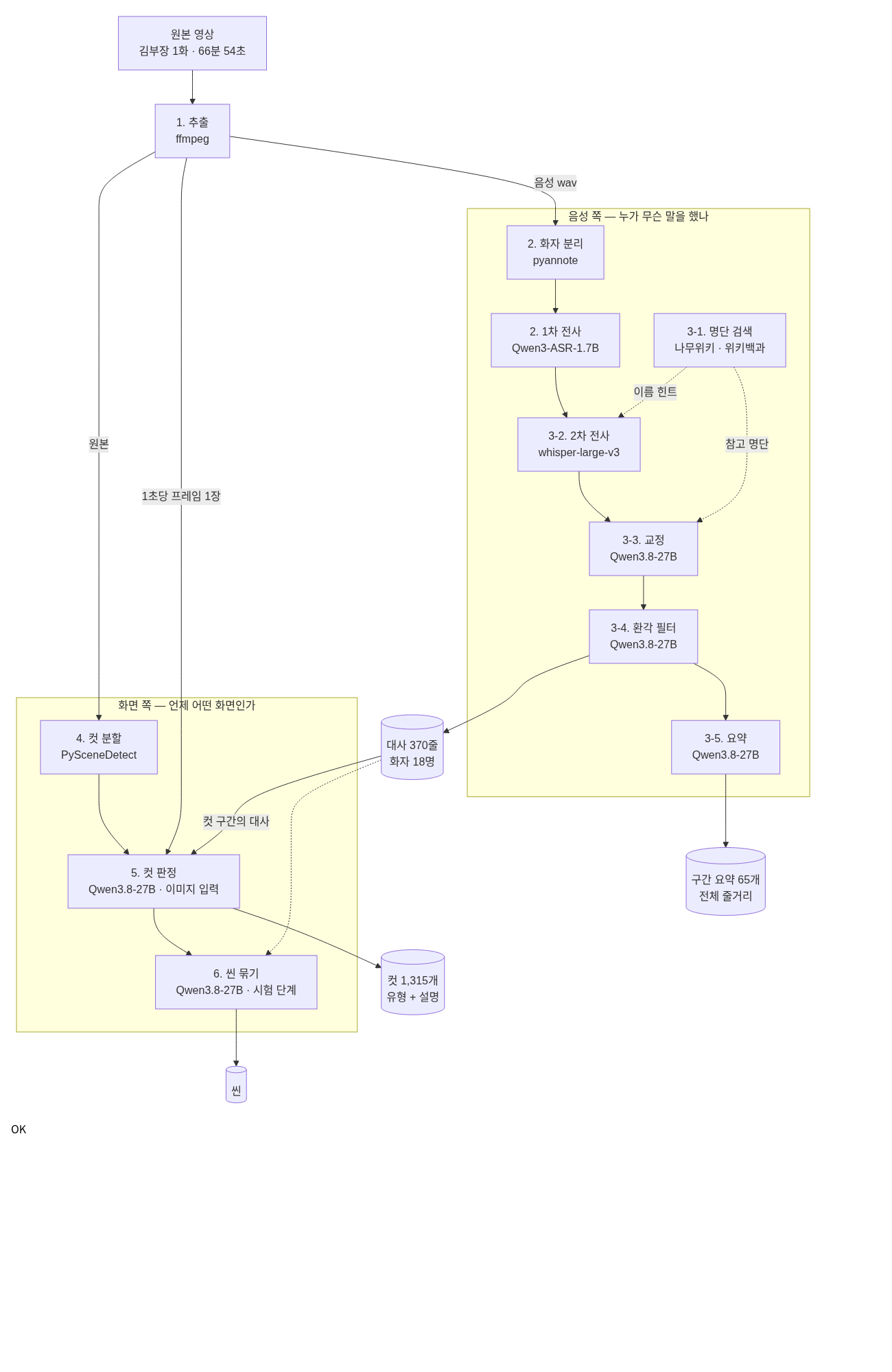
The pipeline can be summarized most simply as follows:
- Audio and frame extraction (ffmpeg)
- Audio → Dialogue (STT)
- Dialogue refinement (correction, hallucination filtering, summarization)
- Identifying scene changes (cut detection)
- Classifying each cut by scene (cut detection)
- Grouping cuts into scenes (scene grouping)
The service is divided into several components, and the final workflow is as follows.
# Order for Processing Episode 1 of the Drama

POST /api/v1/pre_svc                     # agent-stt
 ├ 1) Download the original prep.process file + Extract audio and frames   (worker-prep_stt)
 ├ 2) stt.run speaker separation + initial transcription (worker-prep_stt)
 ├ 3) Search for "pipe_audio.run" → Secondary transcription → Correction → Filtering → Summary (agent-stt)
 │
POST /api/v1/analyze                     # agent-vision
 ├ 4) detect_windows Cut Segmentation (worker-prep-vision)
 ├ 5) vision.run cut detection  ◀── This is the only place to view the screen
 └ 6) Scene-linking cuts → Scenes (still in the testing phase at this stage)
The models used for each step are listed below.
| Step | Model | Input |
|---|---|---|
| 1) Extraction | None (ffmpeg) | Video |
| 2) Speaker Separation | pyannote-diarization | Audio |
| 2) Primary Transcription | Qwen3-ASR-1.7B + Qwen3-ForcedAligner-0.6B | Audio |
| 3) Secondary Transcription | whisper-large-v3 (faster-whisper) | Audio |
| 3) Search, Correction, Filtering, and Summarization | Qwen3.8-27B-FP8 | Text |
| 4) Cut Segmentation | None (PySceneDetect) | Video |
| 5) Cut Detection | Qwen3.8-27B-FP8 | Image + Text |
| 6) Scene Grouping | Qwen3.8-27B-FP8 | Text |
There is only one language model: Qwen3.8-27B-FP8. I deployed it as a vLLM, with one instance running on each of the three GPUs.
vllm serve /mnt/nvme/models/Qwen3.8-27B-FP8 \
    --served-model-name qwen \
    --max-model-len 131072 \
    --max-num-seqs 24 \
    --allowed-local-media-path /mnt/nvme/vod \
    --limit-mm-per-prompt '{"image":30}' \
    --enable-prefix-caching
-max-num-seqs 24: Each GPU can handle up to 24 concurrent tasks.-allowed-local-media-path: This setting is for receiving frame images via file paths. (Used in step 5)
1. Audio and Frame Extraction (ffmpeg)
- Extract one audio file and one frame per second from the original file. Subsequent steps do not reopen the original file.
FPS = 1 # 1 frame per second
FRAME_SIZE = "1280:720"
JPEG_Q = 2 # The lower the value, the higher the image quality

## worker-prep_stt/lib/svc/prep/ffmpeg.py

def extract_media(video_path: Path, audio_path: Path) -> int:
    ...
    cmd = (
        f"{config.FFMPEG_DIR / 'ffmpeg'} -y "
        f"-hwaccel cuda -hwaccel_output_format cuda -hwaccel_device {HWACCEL_DEVICE} -i {video_path} "
        # Output 1: Audio (16k mono)
        f"-map 0:a -vn -ac 1 -ar 16000 -c:a pcm_s16le {audio_path} "
        # Output 2: 1 fps frame (GPU decode → GPU scaling → JPEG)
        f'-map 0:v -vf "fps={FPS},scale_cuda={FRAME_SIZE},hwdownload,format=nv12" '
        f"-q:v {JPEG_Q} -start_number 0 {job_dir}/%05d.jpg"
    )
    proc = subprocess.run(cmd, shell=True, capture_output=True, text=True, timeout=FFMPEG_TIMEOUT)

    # Last frame number = end_idx
    idxs = [int(p.stem) for p in job_dir.glob("*.jpg") if p.stem.isdigit()]
    return max(idxs) if idxs else -1
-
Decode the original file only once to generate both the audio and frames simultaneously.
- Do not read the file twice—once for audio and once for frames.
-
The frame file name corresponds directly to the second.
00123.jpg= 123 seconds of video. Subsequent steps can directly locate the "X seconds of video" using this filename.
-
Skip this step if the original file remains unchanged and the output files already exist.
-
Sample Input/Output
Input:  VOD.mp4 ← 67-minute original
Output:  VOD_audio.wav ← 16 kHz mono
       00000.jpg, 00001.jpg, ... 04014.jpg  ← 1 frame per second (1280x720)
2. Speaker Segmentation + Initial Transcription (pyannote, Qwen3-ASR)
- First, identify the segments where a person spoke and the corresponding speakers, then transcribe only those segments.
## worker-prep_stt/lib/svc/stt/stt.py

def run(audio_path: str, vid: str, category: str = "") -> list[dict]:
    audio = _load_audio(audio_path)

    # 1) Speaker's turn (Since ASR merges the windows into "turns," this comes first)
    turns = run_diarize(audio)

    # 2) Merge Windows + ASR by Window + Sort
    win_results = run_asr(audio, turns, category=category)

    # 3) Assembly: By window (text + items + speaker) → segments
    segs = assemble.assemble_windows(win_results, turns)
    ...
-
Do not input the entire audio clip.
-
If music or silence is mixed in, the timestamps become scattered, and the same words are repeated during silent intervals.
-
If you cut and insert only the speech segments, both of these issues disappear.
-
-
Conversely, segments should not be too short either.
-
If you provide only a single 0.3-second “Yes,” the system will incorrectly identify the language as Russian or Japanese.
-
Therefore, speaker turns are merged into a window of approximately 30 seconds.
-
TARGET_SEC = 30.0   # Target length (not the cutting line)
GAP_SPLIT = 3.0     # A silence longer than this will split the window

## worker-prep_stt/lib/svc/stt/window.py

def make_windows(turns: list[dict], audio_sec: float) -> list[tuple[float, float]]:
    ts = sorted(turns, key=lambda t: t["start"])
    windows = []
    ws, we = ts[0]["start"], ts[0]["end"]

    for t in ts[1:]:
        gap = t["start"] - we
        if gap > GAP_SPLIT or (t["end"] - ws) > TARGET_SEC:
            windows.append((ws, we)) # Close the current window (end of turn = silence)
            ws, we = t["start"], t["end"]
        else:
            we = max(we, t["end"]) # Overlaps/small gaps → merge
    windows.append((ws, we))
    return [(round(s, 3), round(min(e, audio_sec), 3)) for s, e in windows]
-
Conclusion
-
The window always closes at the end of a turn (silence). Do not cut off the middle of a sentence.
-
Do not include silences or music lasting longer than 3 seconds in the window.
-
-
Sample Input/Output
Input:  [Silence··Speech (S1)·Speech (S2)··Music·····Speech (S1)···]   ← Entire audio clip
Output:  [
    {"idx": 0, "start": "00:10:24.0", "end": "00:10:35.0", "text": "...", "lang": "Korean", "speaker": "S005"},
    {"idx": 1, "start": "00:10:36.0", "end": "00:10:45.0", "text": "...", "lang": "Korean", "speaker": "S005"},
    ...
]
3. Dialogue Refinement (Qwen3.8-27B, whisper-large-v3)
- The initial transcription often mistakes words that sound similar to people’s names.
- This section focuses on correcting the transcribed text. Six steps run in sequence.
## agent-stt/lib/svc/audio/pipe_audio.py

#   (Search) → stt → (whisper) → correction → hallucination → (summary)
#
# The order is data-dependent and cannot be changed:
#   Search → whisper: The name selected from the list is used as the "whisper initial_prompt" (improves name accuracy)
#   whisper → Proofreading: The second transcription serves as the [B] reference copy for proofreading
#   Halluci → Summary  : The summary shows only the lines that were kept.
Turn steps on or off depending on the category. For dramas, turn them all on.
## agent-stt/lib/svc/profile.py

TABLE: dict[str, Profile] = {
    "Drama": Profile(audio=Audio(search=True, stt_qwen=True, stt_whisper=True, correct=True,
                               correct_glossary=True, hallu=True, summary=True)),
    "Docu":   Profile(audio=Audio(search=False, stt_qwen=True, stt_whisper=False, correct=True,
                               correct_glossary=False, hallu=True, summary=True)),
    ...
}
3-1. Character List Search
- Search the web for a list of characters using the title and year.
N_QUERIES = 4
SITES = ["namu.wiki", "ko.wikipedia.org", "en.wikipedia.org"]

# ② Query Generation: The LLM generates four "site:<domain> <search term>" queries
# ③ Search + Body: Select one document per query (if fewer than 200 characters, move on to the next candidate)
# ④ Content Compilation: The LLM extracts only the lists from these texts
- Searching takes 20 seconds; the first-pass transcription takes several minutes.
-
Open the search tab first and hide it behind the transcription window. (Wait time: 0)
-
If this fails, proceed without the list.
-
3-2. Secondary Transcription (whisper)
- This does not replace the first pass. It only collects a second opinion for comparison during proofreading.
MIN_SEC = 3.0 # Do not send intervals shorter than 3 seconds
MIN_CHARS = 12     # Does not send messages shorter than 12 characters
MIN_KO = 0.5 # Do not send messages with less than 50% Korean text
- If you send short interjections or foreign language segments, the whisper will invent words that aren’t there.
- Pass the names from the searched list as
initial_prompt.- If the name is correct, the surrounding words will also be stabilized.
3-3. Proofreading
- Divide the dialogue into 30-line segments and send them to the LLM in parallel.
PAGE_MAX_SEGMENTS = 30   # Maximum number of subtitle lines per page (= per LLM call)

## agent-stt/lib/svc/audio/correct/vllm_correct.py

SYSTEM = """You are a proofreader for Korean subtitles (STT results). The input is generated by speech recognition and contains typos and misrecognitions.
Each line consists of "idx: original text," and some lines are followed by [B], indicating that the same audio was transcribed by a different system.

[Proofreading Process — Must Follow This Order]
1) Draft integration — The original text is responsible for the **scope of the content**, while [B] is responsible for the **accuracy of expression**.
2) Verification of Names and Positions — Names of individuals shall follow the notation in the [Reference List].
3) Application of the Glossary
4) Notation Guidelines

[Things to Observe]
- Preserve the number and order of the input lines. Do not merge or split lines.
...
"""
- If a page fails (broken response, line number mismatch), leave the source text as is.
- Not a single line of subtitles can be missing. Proofreading failure < preserving the original text.
3-4. Hallucination Filter
- The LLM identifies only lines in a language other than the primary language and evaluates them based on the surrounding context.
keep   — Authentic Foreign Language Speech (Interviews, Song Lyrics, Commercials)
drop   — Noise-like hallucinations (e.g., meaningless syllables) → Delete
relang — LID misclassification (actually the primary language) → Do not delete; correct only the "lang" field
3-5. Summary
SUMMARY_WINDOW_SEC = 60   # Summary for each 1-minute window
SUMMARY_CHUNKS = 8 # Split into 8 chunks and execute simultaneously. Within each chunk, execution is sequential (to preserve context)
-
Combining multiple segments into a single prompt speeds up processing but causes content to mix between segments.
- We kept the number of calls the same but increased the number of threads to 8.
-
Verifying Results
# Dialogue (t_dialogue) — 370 lines in the 67-minute episode, 18 speakers
seq  start  end  speaker  dialogue
41   624    635  S005     Well, this is the corporate credit card statement. Last Wednesday, 95,000 won was charged for lunch...
42   636    645  S005     The receipt is missing, too—could there be some kind of mistake? ...
45   655    659  S007     Let's just treat it as a company dinner expense, okay?

# Segment Summary (t_dialogue_summary) — 65 1-minute segments
seq  start     end       summary
10   00:11:00  00:12:00  The assistant branch manager acknowledges the criticism and replies that he will classify the expense as a meal allowance. ...
From here on, we handle the screen.
Screen analysis is handled by agent-vision, and heavy video processing is offloaded to a worker (worker-prep-vision).
4. Scene Segmentation (PySceneDetect)
- Identifies points where the scene changes. No model is used.
prep_threshold: float = 15.0   # Threshold for HSV change scores between adjacent frames — the lower the value, the finer the grid
prep_min_sec: float = 1.0 # Minimum segment length — if shorter than this, merge with a neighboring segment
prep_max_sec: float = 15.0     # Maximum segment length — if exceeded, divide evenly

## worker-prep-vision/src/service/prep/detect.py

def detect_scenes(path: Path, threshold: float, min_sec: float) -> tuple[list, float]:
    from scenedetect import SceneManager, open_video
    from scenedetect.detectors import ContentDetector

    video = open_video(str(path))
    total = video.duration.get_seconds()
    min_scene_len = max(1, round(min_sec * video.frame_rate))  # Convert seconds to frames

    sm = SceneManager()
    sm.add_detector(ContentDetector(threshold=threshold, min_scene_len=min_scene_len))
    sm.detect_scenes(video, show_progress=False)

    scenes = [(s.get_seconds(), e.get_seconds()) for s, e in sm.get_scene_list()]
    return scenes, total
-
After detection, it undergoes a three-step post-processing.
-
Merging: Fragments shorter than 1 second are merged with neighboring fragments.
-
Splitting: Fragments longer than 15 seconds are divided evenly. (A safety measure in case fades or dissolves are missed)
-
Snap: Aligns boundaries in 0.1-second increments.
-
-
Assigns a number to each cut based on the “seconds” value rounded up from its start time.
- This number corresponds to the frame file number from Step 1.
-
Processing Log
2026-09-18 17:32:44[INFO] [v1029/VOD] scene_manager.py:575 | Detecting scenes...
2026-09-18 17:34:11[INFO] [v1029/VOD] detect.py:70 | Segment detection: VOD.mp4 (threshold=15.0, fps=29.97) → 1,172 raw scenes / Total 3,711.8s
2026-09-18 17:34:11[INFO] [v1029/VOD] detect.py:234 | Post-processing after segmentation: Raw 1,172 → Merged 1,172 → Split 1,184 → Tiles 1,184 (Total 3,711.8s, Offset 0s)
September 18, 2026, 5:34:50 PM [INFO] [v1029/VOD] vision.py:122 | t_vision registered: line 1184
2026-09-18 17:34:50[INFO] [v1029/VOD] pipeline.py:109 | Prep complete: 1,184 segments, offset 0s (total 126.7s = 87.1s for segmentation + 39.6s for registration)
- In a 62-minute episode, there are 1,184 cuts, taking approximately 2 minutes.
- Sample Input/Output
Input:  VOD.mp4
Output:  [(0, 0.0, 1.6), (2, 1.6, 3.0), (3, 3.0, 7.9), (8, 7.9, 12.9), ...]   ← (number, start time, end time)
5. Cut Detection (Qwen3.8-27B)
- The LLM is called once for each cut. This occurs 1,200 to 1,300 times per episode.
- The input consists of the first frame of the cut and the dialogue for that segment.
## agent-vision/src/domains/drama/stages/vision/prompts.py

SCENE_TYPES: dict[str, str] = {
    "DIALOGUE": "A shot in which two or more characters face each other and converse. This also includes shot/reverse shot when they are talking.",
    "CLOSEUP": "A shot that focuses on a person's face and upper body. The focus is on the person's expression and emotions, and the person they are speaking to is not in the frame.",
    "ACTION": "Scenes in which characters move or perform actions—such as walking, running, driving, fighting, or working—with movement as the central focus.",
    "ESTABLISHING": "A wide shot of a location, landscape, building, or street. A shot with no people or with people appearing small, showing 'where' the scene is set.",
    "GRAPHIC": "Scenes that are not live-action, such as titles, end credits, subtitle graphics, full-screen graphics, and black screens.",
    "AD": "A commercial, not a scene from a drama.",
    "ETC": "Other screens not included in the above categories.",
}

SCENE_MAX_TOKENS = 120   # One sentence of description + one word for the type


def scene_content(root, v_id, stream_id, secs, text) -> list[dict]:
    return [
        {"type": "text", "text": text}, # Text first
        *({"type": "image_url", "image_url": {"url": frame_url(root, v_id, stream_id, s)}}
          (for s in secs), # file:// path
        {"type": "text", "text": "What is the description and type of this screen?"},
    ]
- The text included in the prompt is the scene’s timestamp and the dialogue that begins within it. (Format example)
[Scene] 00:12:03 – 00:12:07
[Dialogue] 00:12:04 Let's talk about that later.
- The response is fixed at exactly two lines.
A man and a woman, both dressed in business attire, sit across from each other at an office desk, discussing documents.
DIALOGUE
## agent-vision/src/domains/drama/stages/vision/prompts.py

def parse(text: str) -> tuple[str | None, str]:
    lines = [_LABEL.sub("", ln).strip() for ln in (text or "").strip().splitlines()]
    lines = [ln for ln in lines if ln]
    if not lines:
        return None, ""
    tail, body = lines[-1], lines[:-1]
    for name in sorted(SCENE_TYPES, key=len, reverse=True):
        if name in tail: # Search for the type only in the last line
            return name, " ".join(body) or tail
    return None, " ".join(lines)
-
Images are passed only via the
file://path.- Do not encode them in base64. The inference server reads them directly from its own disk.
-
Place the text before the image.
- Placing it afterward caused the model to focus solely on the last frame when responding.
-
The scene comes first; dialogue is secondary.
- The prompt explicitly states that the model should not invent elements not present in the scene based on the dialogue.
-
The type is read only from the last line.
- The model is not contaminated even if the type name is mixed into the description sentences.
-
Conclusion
-
Responses outside the type are marked as
ETC. Asking again yields the same answer. -
Cuts where the call failed are left blank. During the next run, only the empty cuts will be automatically re-evaluated.
-
-
I loaded 1,315 cases at once and limited only the number of simultaneous transmissions. Each run took about 3 minutes and 30 seconds.
-
Checking the results
# Cut (t_vision)
idx_sec  start_time  end_time    scene_type  summary
654 00:10:53.5  00:11:01.7  ACTION A man in a black suit is standing in front of the entrance to a luxury home when a man in a beige suit steps out the door...
662 00:11:01.7  00:11:05.2  DIALOGUE    A man in a beige suit stares expressionlessly, then turns to the woman sitting on the bed and ...
675 00:11:14.2  00:11:16.7  CLOSE-UP     A man wearing a beige suit with a black tie and a gold pin on his lapel stands with his eyes closed.
6. Grouping Scenes (Qwen3.8-27B)
- A “cut” is, on average, a 3-second clip. It’s too short to be used as short-form content.
- Consecutive cuts must be grouped into scenes that represent "a single event taking place in the same location".
- The LLM determines how to group them. The input is not images, but the text descriptions and dialogue from the cuts generated in Step 5.
During this period, we tested two approaches to address the question, “How should we divide and query the 1,300 lines of cuts?”
| Period | Method | Text entered at once |
|---|---|---|
| 09-17 | Split into small chunks and queried in about 70 batches | Approx. 1,000 tokens |
| 09-29 | Grouped into large chunks and queried only 5–16 times | Around 10,000 tokens |
- When cut into small pieces, each segment lacks sufficient context before and after.
- When grouped into large chunks, the amount to be read at once is too much.
- The first version of the scene table
# Scene (t_scene_drama)
scene_seq   Scene Number
start_sec   Start seconds
end_sec     End seconds
scene_type  Main Story / Flashback / Recap
place
speakers    List of speaker numbers who spoke during that segment (S001, S003)
cast: Physical descriptions by character number (S003 = man in a suit)
summary     Scene Summary
- During this phase, scenes were created for only two episodes.
Conclusion
The process of extracting dialogue and summaries from the audio, as well as cuts and shot types from the video, has been completed.
The process of grouping scenes remained in the testing phase without a finalized method, and it was confirmed that speakers were distinguished only by numbers, such as S005.
In the future, we plan to first divide episodes into event units and then group scenes accordingly, as well as assign character names to speaker numbers.
Reference Link)
- https://www.scenedetect.com/docs/latest/
- https://docs.vllm.ai/
- https://github.com/pyannote/pyannote-audio
This article presents the results of research conducted with support from the Ministry of Science and ICT and the National IT Industry Promotion Agency’s “2026 Open-Source AI and Software Development and Utilization Support Project.”