Implementation of the "View All" Service

Introduction
This article outlines the process of creating a “one-line summary” from a compilation of scenes related to a single theme, selected from various episodes of a drama.
In Short Form Part 2, I selected scenes from within Episode 1 to create a 3-minute summary.
A “highlight reel” is the process of selecting scenes based on a single theme. There are two types of themes.
| Type | Theme | Example Question |
|---|---|---|
| Plot Compilation | Story within a specific episode range | 20-minute compilation (Episodes 1–2), 1-hour compilation (Episodes 1–10) |
| Scene Compilation | Characters, Actions, Dialogue | Compilation of Director Kim’s and the protagonist’s fight scenes, 2-minute compilation of Park Jin-cheol’s fight scenes |
The main differences from short-form content lie in the scope and length.
| Category | Short-Form | Compilation |
|---|---|---|
| Scope | 1 episode | 1 episode to multiple episodes (this post covers Episodes 2 and 10) |
| Length | 30 seconds to 3 minutes | 2 minutes to 1 hour |
| Number of Clips | 1–12 | 1–470 |
This isn’t a new, separate service. It uses the same scheduling API as short-form content; the only differences are the episodes being grouped, the queries, and the target duration.
POST /api/v1/compose
{
  "query": "20-Minute Summary",
  "budget_sec": 1200
}
The overall workflow is illustrated below.
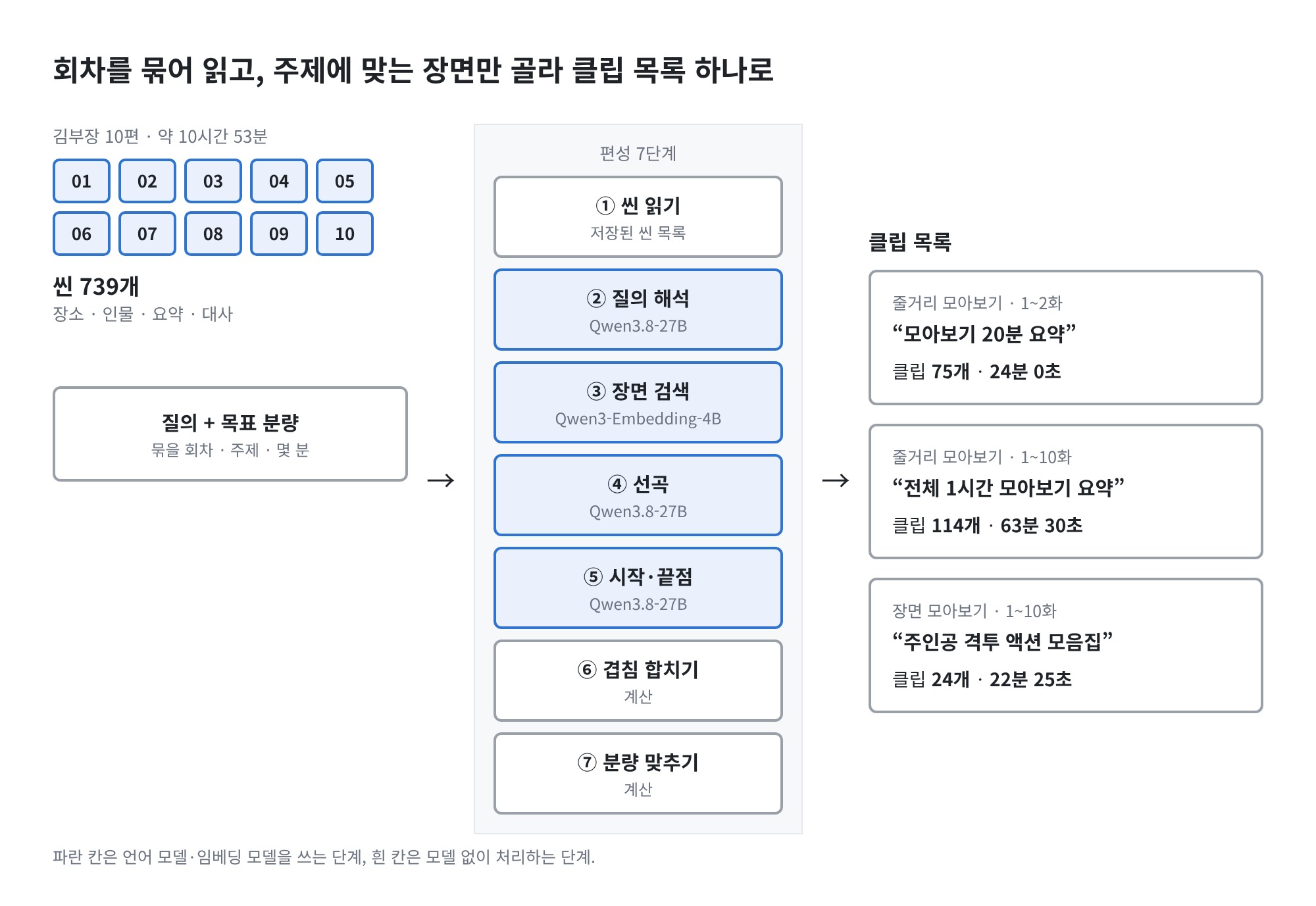
These are the models used at each stage. They are the same as those used for short-form scheduling.
| Stage | Model | Input |
|---|---|---|
| ① Scene Reading | None (DB) | — |
| ② Query Parsing | Qwen3.8-27B-FP8 | Text |
| ③ Scene Search | Qwen3-Embedding-4B | Text |
| ④ Track Selection | Qwen3.8-27B-FP8 | Text |
| ⑤ Start/End Points | Qwen3.8-27B-FP8 | Text |
| ⑥ Merging Overlaps · ⑦ Adjusting Duration | None (Calculation) | — |
During the editing phase, the footage is not rewatched. Only the text associated with the scene—locations, characters, summaries, and dialogue—is read.
This article covers the following topics:
- Materials — Scenes and Search Index
- The Structure That Binds Episodes Together
- 7 Stages of Script Planning
- Plot Overview
- Scene Overview
- Adjusting Running Time
1. Materials — Scenes and Search Index
- The subject is Episode 10 of the SBS drama “Manager Kim.” The total runtime is approximately 10 hours and 53 minutes.
- The unit selected for the compilation is the scene. A scene is a continuous sequence set in the same time and place, and each scene includes a location, characters, and a summary.
- There are 739 scenes across the 10 episodes. The compilation process involves selecting which of these to use.
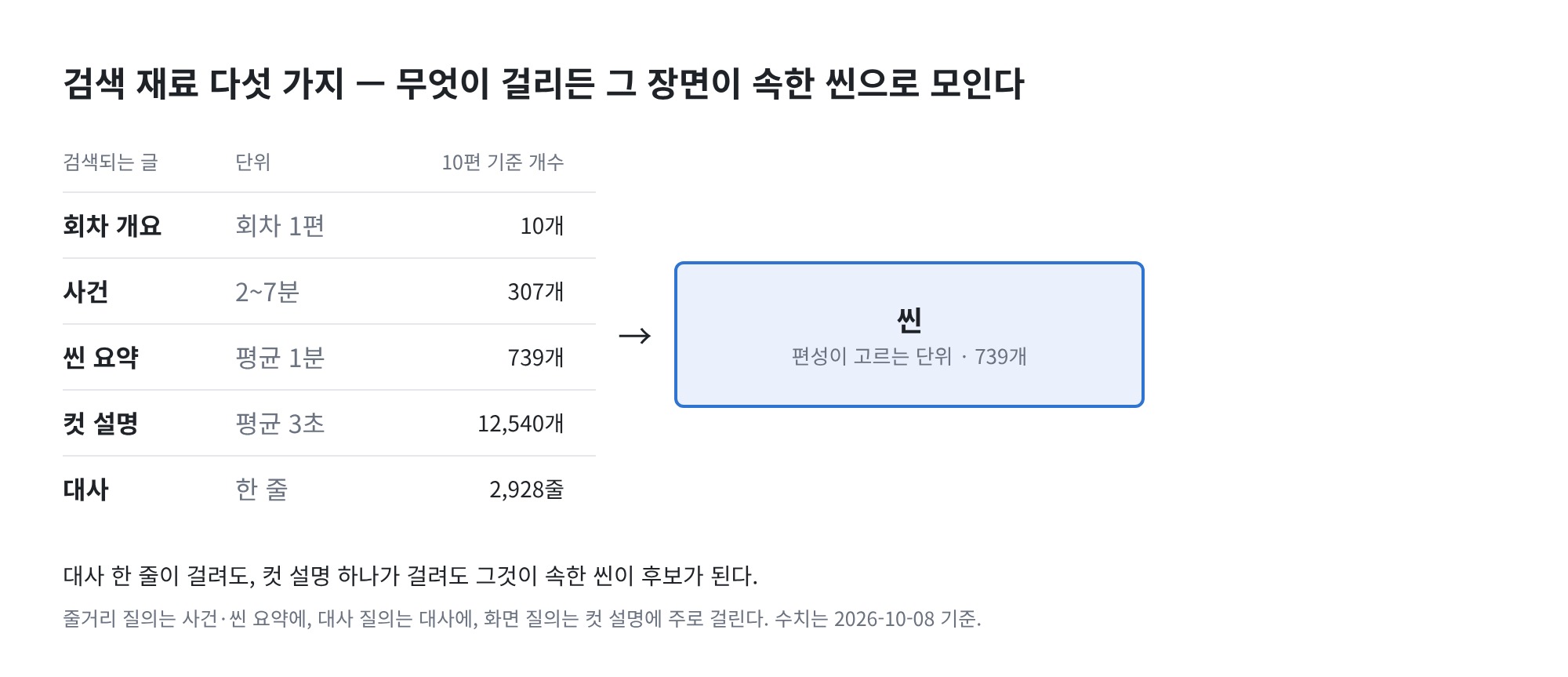
- A search index is provided to find scenes similar to a query.
- It contains five types of entries, ranging from broad units (episode summaries) to granular units (a single line of dialogue).
-
Whatever is found in a search is grouped into scenes.
- If a single line of dialogue is found, the scene to which that dialogue belongs is listed as a candidate.
-
Whether you’re searching for the plot, dialogue, or a specific frame, you search the same index. The type of query is not predefined.
2. Structure for Grouping Episodes
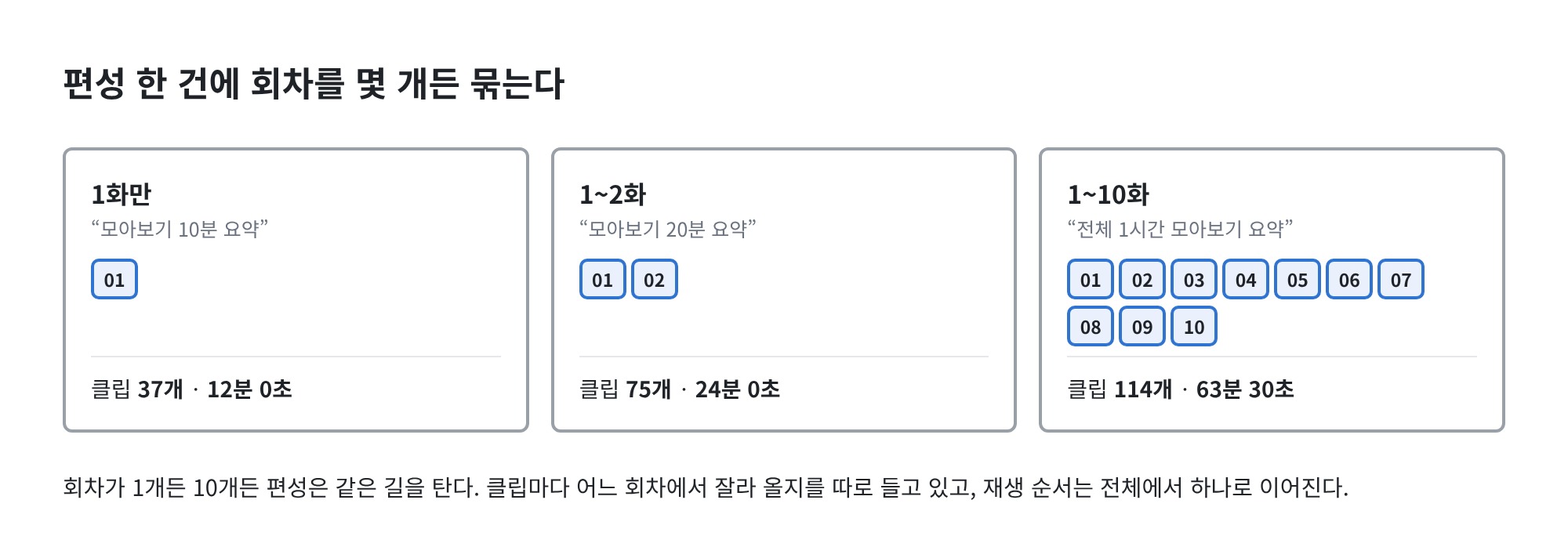
- Any number of episodes can be grouped into a single scheduling entry. Whether it’s just Episode 1, Episodes 1–2, or Episodes 1–10, the process is the same.
-
Each scheduling entry consists of three pieces of information.
-
Scheduling — Query, target duration, result length, number of clips
-
Grouped Episodes — List of episodes this scheduling entry will read
-
Clip — Playback order, episode to cut from, start and end times
-
-
Each clip specifies which episode it is cut from.
- The playback order is continuous throughout the entire playlist. When a clip from Episode 1 ends, a clip from Episode 2 plays next.
-
Whether there is one episode or ten, the playlist creation process is the same. Only the list of included episodes gets longer.
3. 7-Step Playlist Creation (Qwen3-Embedding-4B, Qwen3.8-27B)
- The playlist creation process only accepts requests and responds immediately. The actual work runs in the background, and you can check the progress status to see if it’s finished.
- Only one request is processed at a time. If another request is made while a request is in progress, it is rejected.
- The seven steps of the process are executed sequentially.
| Step | Task |
|---|---|
| ① Read Scenes | Retrieves the list of scenes from the grouped episodes |
| ② Interpret Query | Reads who, what, and how many minutes |
| ③ Search for Scenes | Finds scenes similar to the query in the index |
| ④ Select Scenes | Selects scenes to use from the candidates and ranks them by importance |
| ⑤ Start/End Points | Determines the segments to use within each scene |
| ⑥ Merge Overlaps | Merges overlapping clips into a single clip |
| ⑦ Trim to Length | Trims the footage to match the target length |
- If no scenes match the query, the result is empty. This is not an error. The system does not force the selection of nonexistent scenes.
3-1. Time Required
- Grouping episodes together increases the number of candidate scenes. Grouping 10 episodes yields 739 scenes.
- Even so, a single scheduling session takes only a few minutes to complete.
| Range | Query | Time Taken |
|---|---|---|
| Episode 1 | 3-minute summary of the entire story | 51 seconds |
| Episodes 1–2 | 20-minute summary of the compilation | 1 minute 21 seconds |
| Episodes 1–10 | 1-hour summary of the entire “Drama: Manager Kim” series | 3 minutes 47 seconds |
- It took 3 minutes 47 seconds to read through approximately 11 hours of source material and create a 1-hour summary.
4. Plot Compilation
- Determine the episode range and condense the story within that range to the target length.
- In the query, specify only the topic and desired length. (“20-minute compilation summary”)
- Since the entire story is the subject, all scenes from the grouped episodes are candidates.
- The result is several short clips. They are arranged in episode order, and within each episode, they follow chronological order.
4-1. Episodes 1–2 in 20 Minutes
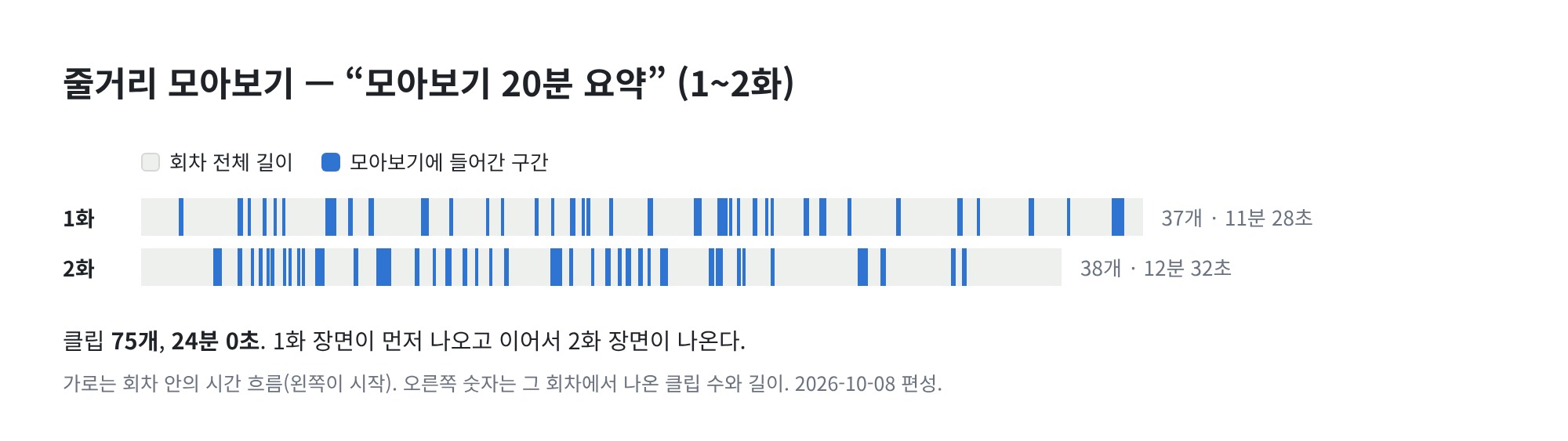
- If you request Episodes 1 and 2 combined, you’ll get 75 clips totaling 24 minutes 0 seconds.
- There are 37 clips from Episode 1 and 38 from Episode 2. The two episodes are included almost equally.
- Each clip averages 19 seconds. It covers the entire episode evenly from start to finish.
4-2. Episodes 1–10 in 1 hour
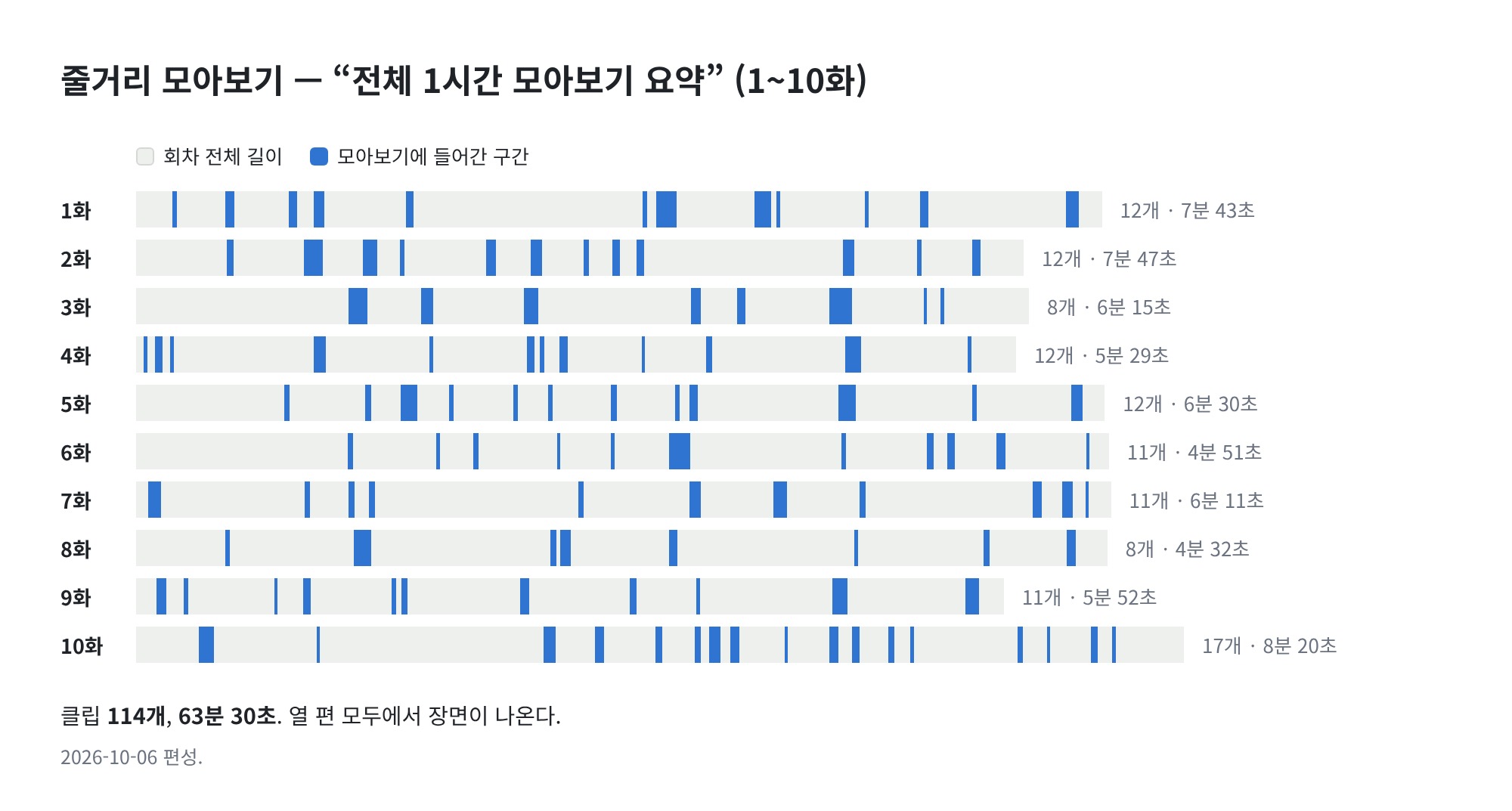
- If you request Episodes 1 through 10 as a bundle, it results in 114 clips totaling 63 minutes and 30 seconds.
- Scenes are included from all ten episodes, ranging from 8 to 17 clips per episode.
- Each clip averages 33 seconds.
- Using the same method, you can condense the 10 episodes into 10 minutes. This results in 27 clips totaling 11 minutes and 57 seconds.
- When requesting a plot summary, you must specify the target runtime.
- Without a target, all candidates remain, resulting in a compilation that lasts several hours.
5. Scene Compilation
- Narrow down the theme by character, action, or dialogue, and compile only those scenes.
- In the search query, specify the scenes you want to find. (“Collection of action fight scenes featuring Manager Kim as the protagonist,” “Scenes of Min-ji fighting”)
- Only scenes that match the theme are considered candidates. It follows the same 7-step process as the plot compilation, but the number of candidates is significantly reduced during the search phase.
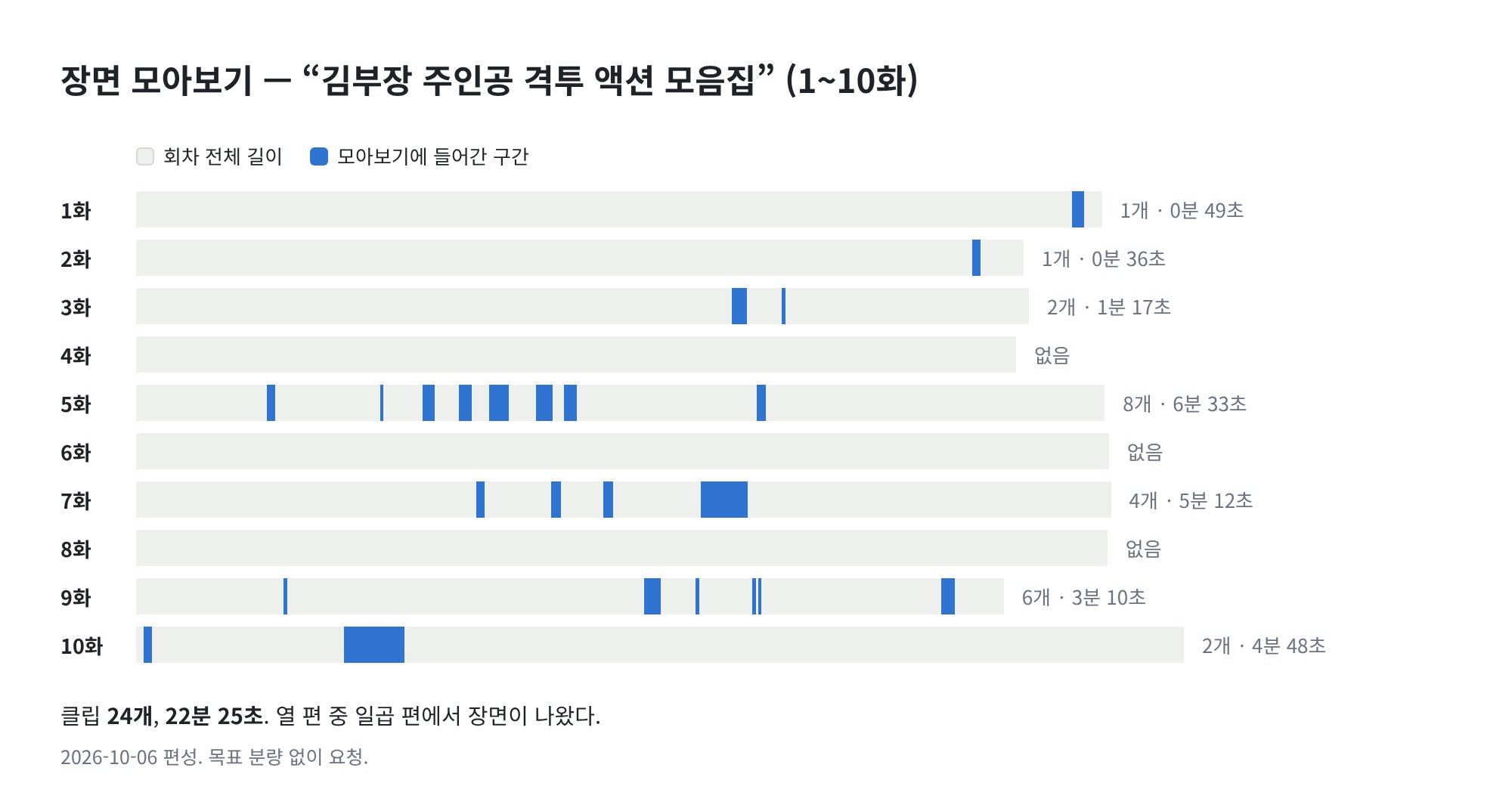
- If you request a compilation of fight scenes from 10 episodes, you’ll get 24 clips totaling 22 minutes and 25 seconds.
- Clips are only selected from episodes that contain the scenes. Eight clips were found in Episode 5, while none were found in Episodes 4, 6, or 8.
- Each clip averages 56 seconds. Since a fight scene must run continuously from start to finish to count as a scene, the clips tend to be longer.
- You don’t need to specify a target duration. Once all scenes matching the theme are collected, the process ends there.
- Other actions are as follows.
| What was written in the query | Action | Example |
|---|---|---|
| One scene | Create one clip for that scene only | Director Kim’s final fight scene → 1 clip, 3 minutes 38 seconds |
| Dialogue | Export the segment containing that dialogue | The line where Min-ji’s father reveals he was a spy → 1 clip, 19 seconds |
| Number | Returns the specified number of clips | Top 10 fight scene highlights → 10 clips |
| No Scene | Returns an empty result | Scene where Min-ji swims in the ocean → 0 clips |
6. Adjusting the Duration
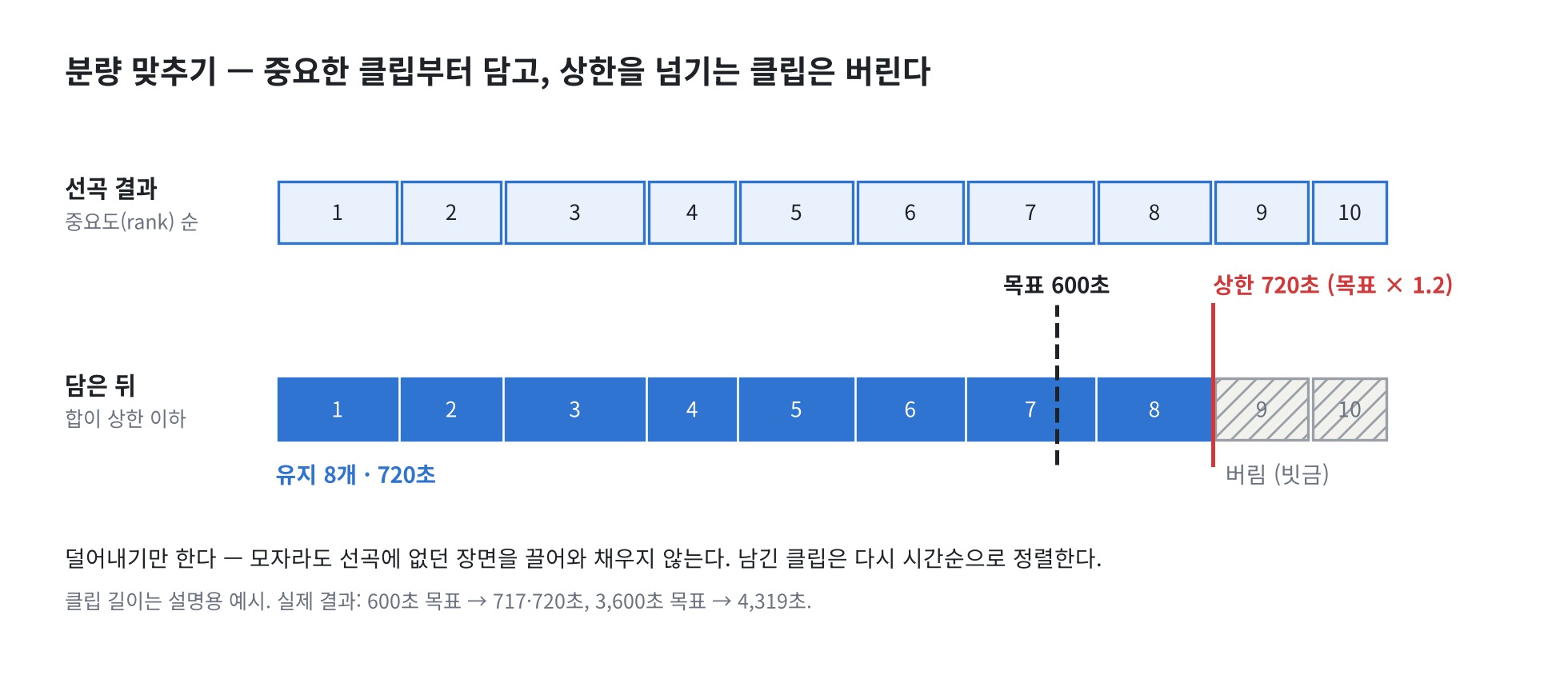
- Do not have the language model calculate the target duration. During the song selection phase, only prioritize clips by importance; the code handles the math for removing clips.
-
There are three rules.
-
Include the most important clips first.
-
Discard any clips that exceed the upper limit.
-
Only remove clips. Do not fill in gaps by adding scenes not included in the initial selection, even if the total falls short.
-
-
The upper limit is set slightly longer than the target.
-
This buffer is included because cutting exactly to the target length usually results in a final clip that’s shorter than intended.
-
The current result ends at 120% of the target. If 10 minutes are requested, 12 minutes are produced; if 20 minutes are requested, 24 minutes are produced.
-
-
When importing, scenes are sorted by importance; when exporting, they are sorted by duration. The compilation must play in the order of the story.
Conclusion
For Episode 10 of “Manager Kim” (approx. 10 hours 53 minutes, 739 scenes), the process—from entering a single query to compiling a clip list of scenes relevant to the topic—has been completed.
The current structure is summarized below.
- We use the same 7-step scheduling process as for short-form content. The only differences are the episodes grouped together, the query, and the target duration.
- A single scheduling entry can group from 1 to 10 episodes.
- The “Plot Compilation” and “Scene Compilation” are created using the same process.
- The 20-minute compilation of Episodes 1–2 takes 1 minute and 21 seconds, while the 1-hour compilation of Episodes 1–10 takes 3 minutes and 47 seconds.
The remaining tasks are as follows:
- The process currently ends with the clip list. The process of merging the list into a single video has not been implemented yet.
- The resulting video length can be up to 120% of the target length.
- Even for the same query, the distribution across episodes may vary each time the process is run.
The process of merging the clips into a video and refining the duration and distribution will be addressed in a future update.
Reference Links)
- https://langchain-ai.github.io/langgraph/
- https://milvus.io/docs
- https://huggingface.co/Qwen/Qwen3-Embedding-4B
- https://docs.vllm.ai/
This article presents the results of research conducted with support from the Ministry of Science and ICT and the National IT Industry Promotion Agency under the “2026 Open Source AI and Software Development and Utilization Support Project.”